In this piece
Building Bilingual Arabic and English AI Products
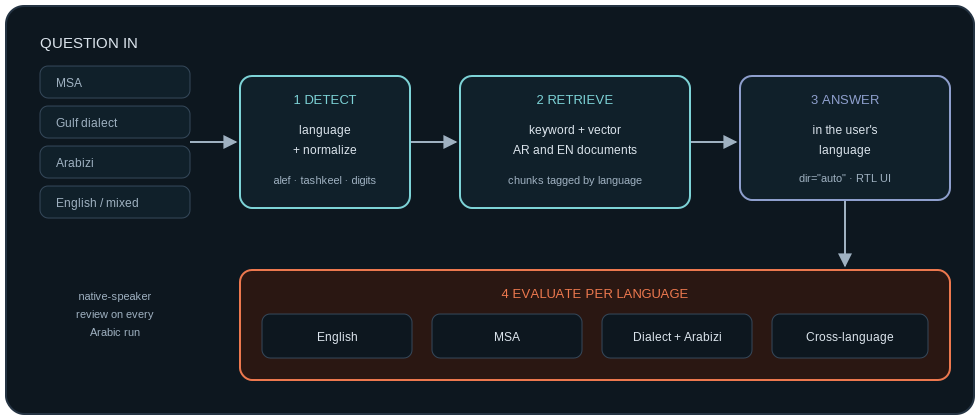
Building an Arabic English AI app for Saudi Arabia or the UAE is not a translation job. Users switch between languages mid-sentence, write in dialect or in Latin letters, and expect the interface to feel native in both directions. The working rule we use is that a bilingual AI product is two products that share one codebase: each language gets its own interface checks, its own search tuning and its own evaluation set. This guide covers the four areas where bilingual AI products most often break: right-to-left interfaces, dialects versus Modern Standard Arabic, Arabic search and tokenization, and evaluation in both languages. It is the approach behind our AI agent development in Saudi Arabia, and it applies equally to customer chat assistants, voice agents, document search and internal tools.
We reviewed the external references on 19 November 2026. Model support for Arabic changes quickly, so test the models you are considering on your own Arabic data rather than relying on general claims.
Building an AI product for Arabic and English users?
Scope your bilingual AIHow do you build a right-to-left interface that works in both languages?
Design for Arabic first and let English follow, not the other way round. Retrofitting right-to-left support into an English layout is where most of the visual bugs come from. The basics, following the W3C guidance on right-to-left text:
- Set
dir="rtl"andlang="ar"on thehtmlelement of Arabic pages, rather than flipping layouts with CSS alone. - Use CSS logical properties such as
margin-inline-startandpadding-inline-endinstead of left and right, so one stylesheet serves both directions. - Use
dir="auto"on chat bubbles and other user or model text, because a single message can start in English and switch to Arabic. - Mirror directional icons (back arrows, progress, sliders), but not logos, media controls or charts with time axes.
- Check numbers, phone numbers, dates and currency amounts inside Arabic sentences; they keep left-to-right order.
- Choose a font with a real Arabic design, and test line height, since Arabic needs more vertical space.
Streaming AI responses add one more trap: text arrives token by token, and the direction of a half-finished line can flip as it fills in. Set the direction on the message container once you know the response language, not per token.
Dialects or Modern Standard Arabic: what should the AI understand and answer in?
Modern Standard Arabic (MSA, often called Fusha) is the shared written standard. Day-to-day messages in the Gulf are often in dialect, sometimes in Arabizi (Arabic written in Latin letters and digits, such as “7” for ح), and often mixed with English words for products and technical terms. A good product separates two decisions:
- What it understands: as wide as possible. Your evaluation set should include MSA, the dialects of your users, Arabizi and mixed messages.
- What it answers in: narrow and deliberate. Most business products answer in clear MSA, which every Arabic reader understands, and in the language the user wrote in. Write this into the system prompt and test that the model follows it.
Voice products add another layer. Speech recognition quality varies by dialect and accent, and a transcript in dialect may not match the MSA wording in your documents. If you are building a voice agent, record test calls from real speakers of each dialect you serve and evaluate the transcript and the answer separately, so you know which step failed.
Names, places and religious or formal expressions deserve their own test cases. A model that is fluent in general can still transliterate a family name wrongly or use an over-casual register in a government context.
Why does Arabic search and tokenization break, and how do you fix it?
Arabic is written with many surface variations of the same word: optional diacritics, several forms of alef, the decorative tatweel stroke, attached prefixes such as al- (“the”) and wa- (“and”), and two digit systems. A search that matches exact strings will miss documents that a human would consider identical. That is why search engines ship Arabic analyzers; the Elasticsearch Arabic analyzer, for example, chains digit conversion, Arabic stop words, Arabic normalization and an Arabic stemmer. If you build your own pipeline, normalize text the same way at indexing and query time:
// Apply the same function when indexing and when searching.
export function normalizeArabic(text: string): string {
  return text
    .replace(/[\u064B-\u065F\u0670]/g, '') // diacritics (tashkeel)
    .replace(/\u0640/g, '') // tatweel (kashida)
    .replace(/[\u0622\u0623\u0625]/g, '\u0627') // alef forms -> bare alef
    .replace(/\u0649/g, '\u064A') // alef maqsura -> yaa
    .replace(/[\u0660-\u0669]/g, (d) => String(d.charCodeAt(0) - 0x0660)) // Arabic-Indic digits -> 0-9
    .toLowerCase(); // for the English and Arabizi parts
}
Three more points for retrieval-based products:
- Use hybrid retrieval. A multilingual embedding model lets an Arabic question find an English document, while keyword search catches exact names and codes. Combine both.
- Store the language with every chunk, so you can filter, measure and debug per language.
- Measure token counts. Many model tokenizers split Arabic text into more tokens than English text of the same meaning, which affects cost, latency and context limits. Count tokens on your own Arabic samples with the tokenizer of the model you choose.
How do you evaluate an AI product in two languages?
An overall score hides the language that is failing. Keep separate evaluation sets and report results per language and per dialect.
| Test set | What it catches | Who reviews it |
|---|---|---|
| English questions, English sources | Baseline quality | Product team |
| MSA questions | Formal Arabic understanding and answer register | Native Arabic reviewer |
| Dialect and Arabizi questions | Real user phrasing, misread intent | Native speakers of those dialects |
| Arabic question, English source (and the reverse) | Cross-language retrieval gaps | Bilingual reviewer |
| Mixed-language messages | Wrong answer language, broken RTL rendering | Bilingual reviewer |
Automated graders, including a language model used as a judge, help with volume, but have a native speaker review a sample of every Arabic run. Fluent-looking Arabic can still be wrong, overly literal or in the wrong register.
Finally, plan where the data lives. Saudi Arabia’s Personal Data Protection Law and the UAE’s data protection rules affect which model providers and hosting regions you can use for personal data, so settle this with your adviser before choosing a model, not after the evaluation is done.

"If the Arabic version is tested only by people who read English first, it is not tested. Bilingual quality needs native reviewers in the loop on every release, not once before launch."
How Devoun can help: our founder worked as a senior backend engineer on DCAA IIAN, the aviation safety investigation application for the Dubai Civil Aviation Authority, supporting its bilingual English and Arabic iOS app (a prior role, before and alongside Devoun). Our AI agent development for Saudi Arabia builds Arabic and English agents with an evaluation set in both languages, starts with a paid Discovery and is delivered in fixed-price milestones covered by our money-back guarantee.
Frequently Asked Questions
Should my AI app answer in Modern Standard Arabic or in dialect?
Most business products answer in clear Modern Standard Arabic, which every Arabic reader understands, while understanding questions written in dialect. Some consumer products answer in a light Gulf register. Decide it per product, write it into the system prompt, and test it with native speakers.
Do I need separate models for Arabic and English?
Usually not. Current large language models handle both, but quality differs by model and by dialect. Test the models you are considering on your own Arabic and English evaluation sets before choosing.
Why does search fail on Arabic text?
The same word can be written several ways: with or without diacritics, with different forms of alef, with taa marbuta or haa, and with attached prefixes such as al- or wa-. Normalize text the same way at indexing and query time, and combine keyword and vector search.
How do I make a web app work right-to-left?
Set dir="rtl" and lang="ar" on the html element for Arabic pages, use CSS logical properties such as margin-inline-start instead of left and right, mirror directional icons, and use dir="auto" for user-generated text.
Final thoughts
Arabic is not a translation layer on top of an English product. Build the interface right-to-left first, understand dialects while answering deliberately, normalize text for search, and measure each language on its own. Do that, and the bilingual product feels native to both sets of users.
