In this piece
Launch Checklist for an MVP With Real Users
Passing QA tells you the software works. It does not tell you what happens when it breaks at 9 p.m. with 200 new users inside it. This MVP launch checklist covers launch-day operations: the things that let you see problems, undo them and talk to users while they happen. There are six areas: monitoring and alerts, rollback and backups, support, analytics, legal pages, and onboarding. It belongs in the scope of any MVP build, and most of it takes hours of setup, not weeks of extra development. For testing before release, use our software QA checklist before launch; this article starts where that one ends, on the day real users arrive. The table gives each item a simple test, so you know when it is really done rather than just started.
We reviewed the external references on 19 November 2026. The legal points below are a practical starting point, not legal advice; check what applies to your product with your adviser.
Launching an MVP and want it ready for real users?
Scope your MVPWhat needs to be in place before real users arrive?
| Area | Minimum for launch day | Done when |
|---|---|---|
| Monitoring | Error tracking, uptime checks, alerts to a named person | A test error reaches someone’s phone |
| Rollback | One-step redeploy of the previous version, feature flags for risky parts | You have rolled back once on staging |
| Backups | Automatic database backups | You have restored one and timed it |
| Support | One channel, one owner, a reply-time promise | A test message gets answered |
| Analytics | Signup, activation event and key actions tracked | You can see your own test account in the funnel |
| Legal pages | Privacy policy and terms of service, linked in the footer and signup | Published and matching what the app really does |
| Onboarding | First-run path to value, helpful empty states, welcome email | Someone outside the team gets to value unaided |
1. Monitoring that wakes a person
Install an error tracker in both the front end and the back end, add an uptime check on your main page and your API, and route alerts to a real person’s phone, not a shared inbox nobody reads. Add a check for the few flows that make you money or create accounts: signup, login and payment. Then trigger a test error and confirm it arrives. A dashboard nobody watches is not monitoring.
2. A rollback you have rehearsed
Know exactly how to put the previous version back, and do it once on staging before launch. Most hosting platforms can redeploy an earlier build in one step. Two things make rollback safe:
- Additive database migrations. Add columns and tables; do not rename or drop them in the same release. Then the old code still works against the new database.
- Feature flags for risky parts. Turning off a flag is faster than any redeploy.
Backups only count once you have restored one. Restore last night’s backup to a scratch database and time it, so you know the real recovery time before you need it.
3. Support with a named owner
Pick one channel (email, chat widget or a shared inbox), put one person in charge for the first week, and say in the app how fast you reply. Early users forgive bugs; they do not forgive silence. Prepare short answers for the questions you can predict: password reset, billing, deleting an account, and “is it down?”.
4. Analytics for the one event that matters
Define your activation event, the action that shows a new user got value (a first report created, a first invoice sent), and track the path to it: visit, signup, activation. That single funnel tells you more in the first week than a hundred tracked clicks. If you collect analytics on personal data, make sure your privacy policy says so.
5. Legal pages that match the product
Publish a privacy policy and terms of service before the first real signup, and link them from the footer and the signup form. In the US there is no single federal privacy law for most apps, but state laws apply: California’s CalOPPA, for example, requires commercial websites and online services that collect personal information from California residents to post a privacy policy (see the California Attorney General’s guide). The policy must describe what the app actually does, including analytics and AI providers that receive user data. A template copied from another company is a start, not an answer; check it with your adviser.
6. Onboarding that works without you
On launch day you cannot sit next to every user. Walk a person outside the team through signup without helping, and fix every place they stop. Replace blank screens with empty states that say what to do next, send a welcome email that links to the first useful action, and make sure a password reset works end to end.
How should launch day itself run?
Do not open the doors to everyone at once. Google’s SRE workbook describes canarying as a partial and time-limited deployment of a change, evaluated before it goes further. For an MVP the same idea means a small first group, such as a waitlist batch or a handful of design partners, then wider access in steps.
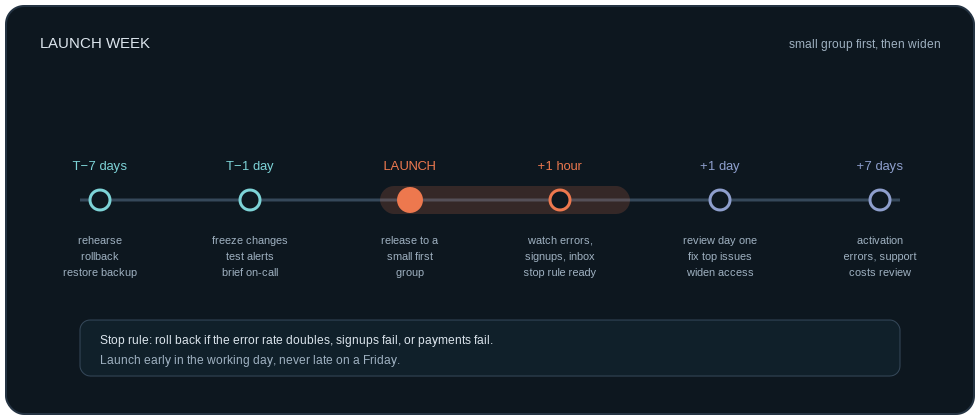
Write the plan on one page and share it with everyone involved:
LAUNCH RUNBOOK (keep it to one page)

Release:      v1.0.0, deployed by <name>, at <time>
Rollback:     redeploy v0.9.4 from the hosting dashboard, or turn off flag "new_onboarding"
Database:     migrations are additive only; last backup restored on <date> (took <minutes>)
Watching:     error tracker, uptime monitor, signup funnel dashboard, support inbox
On call:      <name> (first 24 hours), <name> (backup)
Stop rule:    roll back if error rate doubles, signups fail, or payments fail
Status note:  pinned template ready for the website and email
Freeze non-essential changes for a day or two before launch, launch early in the working day rather than late on a Friday, and keep the first hour clear for watching errors, signups and the support inbox.

"Something always breaks on launch day. The difference between a bad day and a bad week is whether you find out from your error tracker or from your users, and whether you can undo it in one step."
What should you check in the first week?
- Activation rate: what share of signups reach the activation event, and where the rest stop.
- Errors per day, sorted by how many users they hit, not by how interesting they are.
- Support themes: the three questions asked most often usually point to the next onboarding fix.
- Performance on real data, which is often slower than on test data.
- Costs of hosting and third-party services at real usage, before they grow with the next batch of users.
How Devoun can help: whoever builds your MVP, put monitoring, rollback, analytics and onboarding in the written scope, not on a list for after launch. Our MVP development starts with a paid Discovery and is delivered in fixed-price milestones, and a milestone you do not accept is refunded under our money-back guarantee.
Frequently Asked Questions
What should be on an MVP launch checklist?
Error and uptime monitoring with alerts to a named person, a rehearsed rollback and a tested backup restore, a staffed support channel, analytics for your activation event, a published privacy policy and terms of service, and onboarding that gets a new user to value without help.
Should I launch my MVP to everyone at once?
No. Release to a small group first, such as a waitlist batch or a few design partners, watch errors and support messages, and widen access in steps. Problems found with 20 users are far cheaper than problems found with 2,000.
Does my MVP need a privacy policy?
If you collect personal information such as names or email addresses from users, you very likely need one. California’s CalOPPA, for example, requires commercial websites and online services that collect personal information from California residents to post a privacy policy. Check what applies to you with your adviser.
How is a launch checklist different from a QA checklist?
QA checks that the software works before release. A launch checklist covers the operations around it: knowing when something breaks, undoing a bad release, answering users, measuring what they do and meeting basic legal duties.
Final thoughts
An MVP launch is less about the code than about being ready when the code meets real people. If you can see problems, undo them, answer users and measure activation, launch day becomes a learning day instead of a crisis. Most of this checklist takes an afternoon; skipping it can cost you your first users.
