In this piece
n8n vs Make vs Zapier vs Custom Code for AI Automation
If you are comparing n8n, Make and Zapier for AI automation, the honest answer is that the tool matters less than where the workflow will live in a year. Zapier is the quickest way for a business team to connect common SaaS apps. Make gives more visual control over branching and data mapping on a similar hosted model. n8n is the one you can run on your own servers, which matters when data cannot leave your infrastructure. Custom code is the right home when the automation becomes part of your product, needs tests and an evaluation set, or runs at a volume where per-task pricing hurts. Most teams we work with end up with a mix: a no-code tool for glue work, and code for the AI step that must be reliable. This comparison covers hosting, licensing, data control and testing, and when to switch. It reflects how we scope AI workflow automation projects.
We reviewed the external references on 19 November 2026. We do not quote plan prices because they change often; check the n8n, Make and Zapier pricing pages for current numbers.
Not sure which home your workflow needs?
Get a recommendationn8n vs Make vs Zapier: what is the real difference?
All three connect apps with triggers and actions, and all three can now call large language models as a step. The differences that matter for an AI workflow are where it runs, who controls the data, and how much logic you can express before the visual editor becomes the problem.
| Zapier | Make | n8n | Custom code | |
|---|---|---|---|---|
| Where it runs | Vendor’s cloud | Vendor’s cloud (region chosen at setup) | n8n Cloud or your own servers | Your cloud |
| License | Proprietary service | Proprietary service | Sustainable Use License (source available) | You own the code |
| Best for | Business teams, common SaaS apps | Visual branching and data mapping | Technical teams, self-hosting | Core product logic |
| Testing and versioning | Limited | Limited | Better, still visual-first | Full: tests, review, CI |
| Cost driver | Tasks per month | Operations or credits | Executions, or your hosting | Engineering and upkeep |
Cost drivers are summarized from each vendor’s pricing page and change over time, so check before you commit.
Can you self-host n8n, Make or Zapier?
Of the three, n8n is the one built to be self-hosted; Make and Zapier are cloud services (check each vendor’s current options before you decide). n8n’s code is published under the Sustainable Use License, which allows use for your own internal business purposes and restricts commercial redistribution. Enterprise features sit under a separate license. The n8n hosting docs explain that without a license key it runs as the free Community edition, and that Business or Enterprise keys unlock those editions. If you plan to embed n8n in a product you sell, read the license with your lawyer first.
Make and Zapier are hosted services. Make lets you choose a data center region when you create an organization, and its help center notes that the location cannot be changed afterwards. Make also documents that some of its built-in AI features are processed in the US regardless of the region you picked. For an AI workflow, check where the model call goes, not just where the automation platform runs.
Self-hosting is not free in practice. Someone has to patch it, back it up, monitor it and handle a failed upgrade at 2 a.m. If you have no one for that, n8n Cloud or a hosted tool is usually the better choice.
What changes when the workflow includes AI?
A classic automation is deterministic: the same input gives the same output, and a failed step throws an error. An AI step is different. It can return a confident, well-formed answer that is wrong, and nothing in the workflow will flag it. That changes what you need from the platform:
- Logs of every model input and output, kept long enough to investigate a complaint weeks later.
- Structured outputs (a fixed set of categories, a JSON shape) instead of free text that the next step has to interpret.
- A human review path for low-confidence or high-impact decisions, such as refunds or anything a customer will see.
- Control over the model and its version, so a provider update does not silently change behavior.
All three tools can do parts of this. The more of the list you need, the stronger the case for running the AI step in code you can test.
When should AI automation move to custom code?
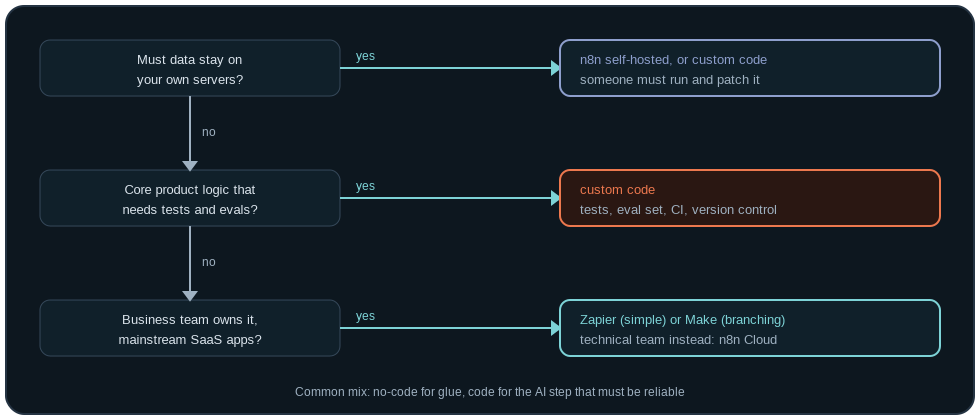
No-code tools are excellent until one of these becomes true:
- The workflow is business-critical. If a silent failure costs money or customers, you need alerts, retries and logs you control.
- The AI step needs evaluation. A classifier or agent that makes decisions needs an eval set and a release gate. That is far easier to build around code than around a visual step.
- Nobody can read the flow any more. Forty nodes with nested routers are harder to review than the equivalent 200 lines of code.
- Volume makes per-task pricing expensive. At high volume, a small service on your own cloud can cost less than task-based billing. Run the numbers with your own volumes.
- Data rules forbid a third-party cloud. Health, finance and some enterprise customers will ask exactly where data flows.
The middle path works well: keep the no-code tool for triggers and notifications, and move the AI step into a small, tested service it calls.
# Illustrative: the no-code tool keeps the glue work and calls one tested endpoint
# for the AI step that has to be reliable.
POST /api/classify-ticket
{ "ticketId": "T-4821", "text": "Charged twice for my March invoice" }

200 OK
{ "category": "billing", "priority": "high", "confidence": 0.91, "model": "classifier-v7" }
"No-code tools are not the problem. The problem is when a workflow quietly becomes the core of the business and is still living in a tool nobody tests."
Which should you choose?
- Zapier if a business team will own it, the apps are mainstream, and speed to first result matters most.
- Make if the same team needs more complex branching, iteration and data transformation, and a hosted cloud region is acceptable.
- n8n if you have technical people, want to self-host for data control, or want to write code inside nodes when needed.
- Custom code if the automation is part of your product, needs tests and evaluation, or has outgrown the visual editor.
How Devoun approaches it: in our AI workflow automation work we map the process first and often recommend keeping parts in the tool you already pay for. Discovery is valued at $400, 50% free (you pay $200, credited to the build), and fixed-price milestones are covered by our money-back guarantee.
Frequently Asked Questions
Is n8n free to self-host?
The Community edition runs without a license key, and the Sustainable Use License allows use for your own internal business purposes. You still pay for the server and the time to run it, and some features need a paid Business or Enterprise license. Reselling or hosting it for others is restricted, so read the license for your case.
Can I self-host Make or Zapier?
No. Both are hosted services. Make lets you choose a data center region when you create an organization, and that choice cannot be changed later. If data must stay on your own infrastructure, n8n or custom code are the realistic options.
Which is best for AI agents: n8n, Make or Zapier?
All three can call large language models. n8n tends to suit technical teams building multi-step AI workflows they want to host themselves, while Zapier and Make suit business teams connecting AI to common SaaS apps. For an agent that is core to your product, custom code gives you testing, evaluation and version control.
When should I move an automation from no-code to custom code?
When it becomes business-critical, needs automated tests or an evaluation set, has logic too complex to read in a visual editor, runs at a volume where per-task pricing gets expensive, or handles data you cannot send to a third-party cloud.
Final thoughts
Pick the tool for who will own the workflow and where the data must live, not for the longest integration list. Start in no-code when speed matters, keep the AI step testable, and move it into code as soon as it becomes something your business cannot afford to get wrong.
