In this piece
AI Agent vs Chatbot vs Workflow Automation: Which Do You Need?
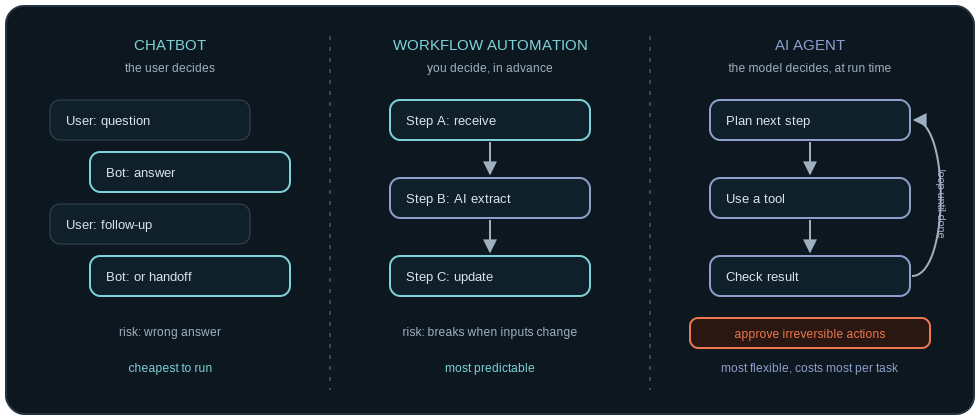
Vendors call all three of these “AI”, but they are different tools. A chatbot answers questions in a conversation. Workflow automation runs a sequence of steps you define in advance, sometimes with a language model handling one of them. An AI agent decides its own next steps and uses tools until it reaches a goal. The choice is less about how advanced you want to be and more about one question: are the steps known before the work starts? If they are, a workflow is cheaper, faster and easier to test. If people mainly need answers, a chatbot is enough. An agent earns its extra cost and risk only when the path genuinely changes from case to case. This comparison explains each option, where each one fails, and a short test to decide what your business needs before you commission AI agent development.
We reviewed the external references on 19 November 2026. The definitions below follow the ones most AI engineering teams use, so you can compare vendor proposals on the same terms.
Want an outside view on which one your process needs?
Get an honest recommendationWhat is the difference between an AI agent, a chatbot and workflow automation?
Anthropic’s engineering guide, Building effective agents, draws the line that matters. Workflows orchestrate models and tools through predefined code paths; agents let the model direct its own process and tool use. A chatbot sits beside both: it is an interface for conversation, and behind it can be simple retrieval, a workflow or an agent.
| Question | Chatbot | Workflow automation | AI agent |
|---|---|---|---|
| Who decides the next step | The user, by asking | You, in advance | The model, at run time |
| Typical job | Answer questions, collect details | Route, extract, update, notify | Research, resolve, multi-step tasks |
| Takes actions in your systems | Rarely | Yes, fixed ones | Yes, chosen by the model |
| Predictability | High for answers | Highest | Lowest |
| Running cost per task | Low | Low | Higher: more model calls and retries |
| Main risk | Wrong or invented answers | Breaks when inputs change | Wrong actions taken confidently |
When is a chatbot enough?
When most requests are questions with answers in your documents, policies or product data: opening hours, delivery times, how a feature works, what a plan includes. A chatbot that answers from your own knowledge base and hands off to a person for everything else solves a large share of support volume without taking any action in your systems. That is also why it is the easiest to make safe. If you serve customers in Arabic and English, our guide to bilingual chatbots for Saudi and UAE customer service covers the extra work.
When is workflow automation the better choice?
When you can write the steps down and they rarely change: an invoice arrives, its fields are extracted, it is matched to a purchase order, and exceptions go to a person. A language model may do the extraction or the classification, but the order of steps is fixed in code or in a tool such as n8n, Make or Zapier. Workflows are cheaper to run, faster, and much easier to test, because every run follows the same path. Most of the automation value in a typical business sits here, which is why we often recommend AI workflow automation before an agent.
When do you actually need an AI agent?
An agent is worth its cost when three things are true at once:
- The path changes from case to case, so you cannot write the steps in advance.
- The task needs several tools, and which ones depends on what is found along the way.
- You can measure whether the outcome was right, so you can test and improve it.
Investigating why a shipment is late across carrier, warehouse and order systems is a good example; answering “where is my order?” is not. Anthropic’s guide recommends the simplest solution that works and adding complexity only when it improves results, because agents trade latency and cost for flexibility. Agents also carry risks that chatbots and fixed workflows mostly do not: the OWASP Top 10 for LLM Applications lists prompt injection and “excessive agency” among the main ones. Keep a human approval step on anything irreversible, such as refunds, payments or deleting records.
A quick test you can run on any process before you talk to a vendor:
For one real request, write down the steps a person takes.

Same steps every time?            -> workflow automation
Same steps, but a judgment call
inside one of them?               -> workflow with an AI step
Mostly answering questions?       -> chatbot (with handoff)
Steps depend on what is found
along the way, and vary a lot?    -> AI agent, with approval
                                     on anything irreversible
In practice the best systems are usually hybrids. Take customer support for an online shop. A chatbot is the front door and answers policy questions from the knowledge base. When a customer asks for a refund, the chatbot hands the request to a fixed workflow: check the order, check the refund rules, and either issue the refund under a set amount or route it to a person. Only the messy cases, such as a parcel the carrier says was delivered and the customer says was not, go to an agent that can search the carrier, warehouse and order systems and prepare a recommendation for a human to approve. Each part does what it is good at, and the expensive, less predictable part handles only the cases that need it.
The same split helps with cost. Most of the volume runs through the chatbot and the workflow, which make few model calls per request. The agent may make many calls and retries per case, so keeping it for a small share of cases keeps the running bill predictable. Our AI agent cost guide shows how to estimate that cost per task before you build.

"If you can draw the process on a whiteboard and it looks the same every time, you do not need an agent. You need a workflow with one smart step in it."
How Devoun helps you choose
We build all three, so we have no reason to push the most expensive one. Our founder has built AI agents and AI workflows before and alongside Devoun, including an airline booking agent prototype with approval required before payment steps, and background-agent workflows for candidate verification. Every AI project starts with a Discovery valued at $400, 50% free (you pay $200, credited to the build), which maps the process and recommends the simplest option that does the job, with a fixed quote per milestone. A milestone that is not accepted is refunded under our money-back guarantee.
Frequently Asked Questions
What is the difference between an AI agent and a chatbot?
A chatbot answers in a conversation and usually takes no action beyond replying. An AI agent works towards a goal, decides which steps to take and uses tools such as your CRM, email or booking system to take them.
Is workflow automation the same as an AI agent?
No. Workflow automation follows steps you define in advance, even when a language model handles one of the steps. An agent chooses its own steps at run time. Workflows are more predictable and cheaper to run; agents are more flexible.
Is an AI agent better than a chatbot?
Not by default. An agent is more capable but slower, more expensive per task and harder to test. If a chatbot or a fixed workflow does the job reliably, it is usually the better choice.
Can one system combine all three?
Yes, and many do. A common pattern is a chatbot as the front door, fixed workflows for known requests such as refunds or bookings, and an agent only for the open-ended cases, with a human approval step for anything irreversible.
Final thoughts
Start from the process, not the technology. Questions call for a chatbot, known steps for a workflow, and only genuinely open-ended, multi-tool work for an agent. Many good systems use all three, with the agent kept for the small share of cases that really need it.
