In this piece
Bolt.new App to Production: A Deployment Checklist
Bolt.new can build and run a full-stack app in minutes, all inside your browser. That is also why so many Bolt apps break the moment they are deployed: Bolt runs your code in a StackBlitz WebContainer, and a real host is a different machine with its own build, environment variables and routing rules. This checklist is the order we follow when we take a Bolt.new app into production. Work through it top to bottom before you send real users or real payments to the app.
We reviewed the external references on 19 November 2026. Bolt’s settings and the hosts’ dashboards change often, so check the current screens as you go.
Rather have someone else get your Bolt app live?
Get a production reviewWhy “it works in Bolt” is not enough
A WebContainer is a Node.js runtime that runs in the browser tab. It is ideal for building fast, but it hides the things that break in production: missing environment variables, different Node versions, server-only code imported into the client, and file paths that only exist in the sandbox. Netlify’s own guide notes that Bolt keeps your app’s environment variables in its own environment, so the host does not see them until you add them yourself.
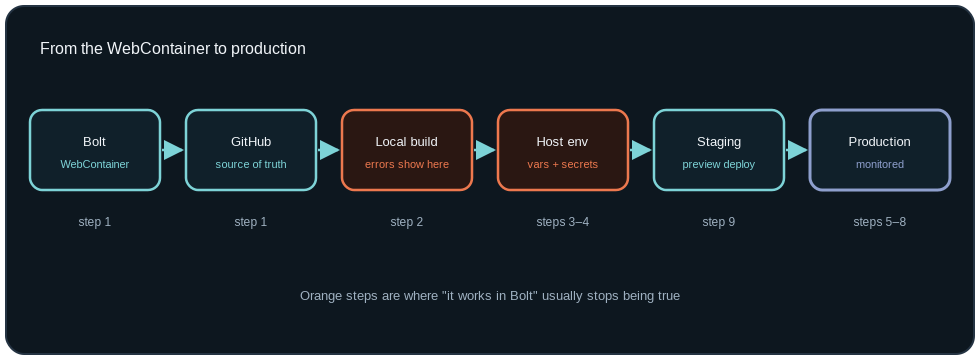
The deployment checklist
1. Put the code in GitHub
Connect or export the project to a GitHub repository and treat it as the source of truth from now on. You get history, code review and the ability to roll back, none of which a chat transcript gives you.
2. Reproduce the production build on your own machine
Clone the repository and run a clean install and production build, using the same Node version as your host. Fix every error and warning here, where they are cheap, rather than in a failed deploy log.
npm ci
npm run build
npm run preview   # or: npm start for a Node server
3. Set every environment variable on the host
List every variable the code reads, then add each one in the host’s settings. On Netlify, variables must have a scope that includes builds to be available during the build. Trigger a fresh deploy after adding them; existing builds do not pick up new values.
4. Move secrets out of the front end
In a Vite project, any variable prefixed with VITE_ is compiled into the browser bundle. Payment keys, database service keys and third-party API keys belong in serverless functions or a backend, never in a VITE_ variable.
5. Add SPA rewrites
If the app is a single-page React app, refreshing any page except the home page returns 404 unless the host rewrites unknown paths to index.html. Add a _redirects file on Netlify or a rewrite in vercel.json on Vercel.
6. Validate everything on the server
Prompt-built forms often check input only in the browser. Anyone can skip that and call your API directly. Validate types, lengths and permissions in every API route or function, and check that the signed-in user is allowed to touch the record they are changing.
7. Remove duplicated and dead code
Iterating by prompt leaves several versions of the same component, unused routes and conflicting styles. Each one is a place for a bug to hide. Delete what is not used and consolidate duplicates before launch, not after.
8. Turn on error tracking, uptime checks and backups
Add an error tracker to the front end and the functions, an uptime check on the main pages, and test a database backup by restoring it. Without them you learn about problems from customers.
9. Use a staging site
Deploy every change to a preview or staging site first, test the main user journeys there, then promote it to production. Most hosts give you preview deploys per branch for free.
| Symptom after deploy | Likely cause | Step |
|---|---|---|
| Build fails on the host but worked in Bolt | Node version or server-only import | #2 |
| Blank page or “undefined” API URL | Variables not set on the host, or set after the build | #3 |
| API key visible in the browser’s developer tools | Secret in a client-side variable | #4 |
| 404 when refreshing any inner page | No SPA rewrite | #5 |
| Users can see or change each other’s data | No server-side permission checks | #6 |

"The fix is rarely hard. The hard part is that nobody can see the problem from inside the Bolt preview. Reproducing the production build locally finds most issues in the first hour."
When to get help
If the app takes payments, stores personal data or is about to be shown to investors, a review before launch costs far less than an incident after it. Devoun’s Bolt.new app rescue starts with a scoped, fixed-fee audit, then fixes the findings at a fixed price, covered by our money-back guarantee.
Frequently Asked Questions
Why does my Bolt.new app break after I deploy it?
Bolt runs your app in a WebContainer inside the browser. A real host has its own environment variables, Node version and build process. The most common causes are environment variables that were never added to the host, a production build that fails, and client-side routes that return 404 on refresh.
Where do I put environment variables for a Bolt app on Netlify?
In the Netlify site settings under environment variables, or with the Netlify CLI. Bolt keeps its variables in its own environment, so Netlify does not see them until you add them and trigger a new build.
Can I move my Bolt.new project off Bolt?
Yes. Connect or export the project to GitHub, then build and deploy it from the repository on the host you choose. From then on, treat the repository as the source of truth.
Is Bolt.new code good enough for production?
Often the UI and data model are worth keeping. What usually needs work is security, server-side validation, duplicated code and monitoring. An audit tells you what to keep, harden or replace.
Final thoughts
Bolt.new removes the slowest part of building software. It does not remove the need for a boring, repeatable deployment. Get the code into GitHub, make the production build pass on your own machine, and treat the host’s settings as part of the app. Do that and “it works in Bolt” becomes “it works”.
