In this piece
Lovable App Not Working in Production? 12 Fixes
If your Lovable app works in the preview but breaks once real users arrive, the cause is almost never Lovable itself. It is the handful of settings that the preview handles for you and production does not: Supabase Row Level Security, auth redirect URLs, environment variables, client-side routing, Edge Function secrets, payment webhooks and email. Below are the 12 fixes we apply most often when we take a Lovable app into production, in the order we apply them: security first, then sign-in, then deployment, then payments and data.
Lovable generates a React, Vite, Tailwind and TypeScript front end and usually connects it to Supabase for the database, authentication, file storage and Edge Functions. Every fix below is about that stack.
We reviewed the external references on 19 November 2026. Supabase and Lovable change their defaults often, so check each setting against the current dashboard.
Want a second pair of eyes on your Lovable app before launch?
Get a production reviewWhy Lovable apps break when they go live
A prompt-built app is optimised to look right on screen. Production needs it to behave right when someone tries to break it, when a payment provider retries a request, and when the app runs on a domain it was never tested on. The gap is real and it has already been exploited: in 2025 a vulnerability was published as CVE-2025-48757 after a researcher reported that about 170 of 1,645 scanned Lovable showcase apps let unauthenticated visitors read or write database tables because of missing or weak Row Level Security policies. Lovable has added security scanning since then, but the responsibility for each app’s policies stays with the app owner.
| Symptom | Most likely cause | Fix |
|---|---|---|
| Other users’ data shows up, or anyone can change rows | RLS off or a policy without a user check | #1, #2 |
| Login loops or lands on the lovable.app domain | Supabase Site URL and redirect list still point at the preview | #5, #6 |
| Sign-up emails arrive late or not at all | Default Supabase email sender | #7 |
| Any page except the home page shows 404 after a refresh | No SPA rewrite on the host | #8 |
| Blank page or “supabaseUrl is required” in the console | Environment variables not set on the new host | #9 |
| Edge Function calls fail with CORS errors | Missing CORS headers or OPTIONS handling | #10 |
| Payments succeed but orders or subscriptions are missing or doubled | Unverified, non-idempotent Stripe webhook | #11 |
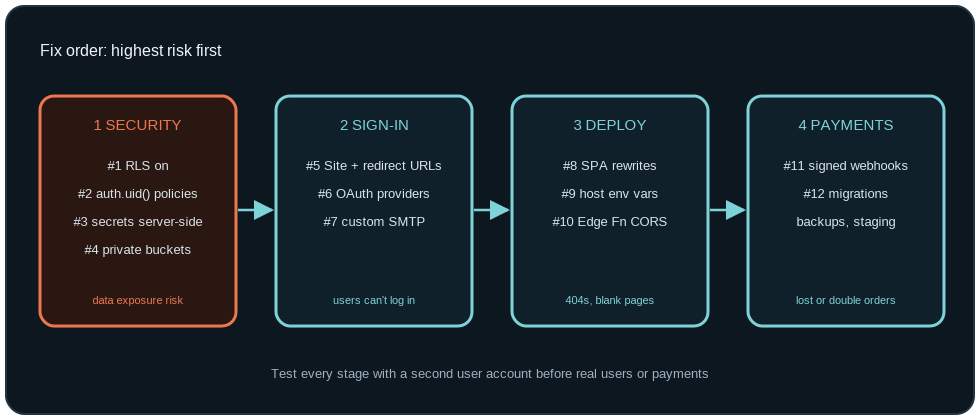
Security fixes (do these first)
1. Turn on Row Level Security for every table
The Supabase anon key in your front end is meant to be public. What protects your data is Row Level Security. With RLS off, anyone who copies the anon key from your JavaScript can query the table directly. Open every table in the Supabase dashboard and check that RLS is enabled, including tables the AI created late in the project.
2. Write policies that check who the user is
Enabling RLS is half the job. A policy such as using (true) or one that only checks that a user is signed in still lets every signed-in user see everyone’s rows. Policies should compare the row owner with auth.uid():
-- 1. Turn RLS on for every table that holds user data
alter table public.projects enable row level security;

-- 2. Let users read and change only their own rows
create policy "Users read own projects"
  on public.projects for select
  using (auth.uid() = user_id);

create policy "Users update own projects"
  on public.projects for update
  using (auth.uid() = user_id)
  with check (auth.uid() = user_id);
Then test it the way an attacker would: create a second account, and try to read and edit the first account’s records through the app and through the Supabase API.
3. Keep secrets out of the browser
In a Vite app, every variable that starts with VITE_ is bundled into the client JavaScript, where anyone can read it. The Supabase service_role key, Stripe secret keys and third-party API keys must live only in Edge Functions or server-side settings. Search your repository for each secret’s prefix (for example sk_live) to make sure none slipped into the front end.
4. Lock down storage buckets
Buckets for avatars or uploads are often created as public during prompting. Private documents, invoices and IDs need a private bucket with storage policies, and signed URLs when a user needs to download a file.
Sign-in fixes
5. Set the Site URL and redirect URLs to your real domain
Supabase Auth only redirects to addresses on its allow list. If the Site URL is still the lovable.app preview, magic links, password resets and sign-ups send users back to the preview or fail. Set the Site URL to your production domain and add every domain you use (production, staging, preview) to the redirect list.
6. Update the OAuth providers
For Google, GitHub or Apple sign-in, the provider’s console must list your Supabase callback URL, and your app must pass a redirectTo on your own domain. A login that works in preview and loops in production almost always means one of these two lists was not updated.
7. Use your own email sender
The built-in Supabase email service is meant for testing and has a low sending limit. For real users, connect a custom SMTP provider and send from your own domain with SPF and DKIM set, or confirmation emails will be slow, rate-limited or filtered as spam.
Deployment fixes
8. Stop the 404 on page refresh
A Lovable app is a single-page app: React handles routes such as /dashboard in the browser. When a user refreshes that page on a static host, the server looks for a file that does not exist and returns 404. Add a rewrite to index.html. On Vercel, a vercel.json file:
{
  "rewrites": [{ "source": "/(.*)", "destination": "/index.html" }]
}
On Netlify, a public/_redirects file with one line:
/* /index.html 2009. Set the environment variables on the new host
When you export the project from Lovable to GitHub and deploy it elsewhere, the Supabase URL and anon key are not carried over automatically. Add them in the host’s environment settings and rebuild. A blank page with a “supabaseUrl is required” error in the console is the classic sign.
10. Give Edge Functions their secrets and CORS headers
Secrets used by Edge Functions are set in Supabase, not in your front-end environment. Browser calls to a function also need CORS headers on every response, including the preflight OPTIONS request. Missing either one shows up as a vague “Failed to fetch” in the app.
Payments and data fixes
11. Verify Stripe webhooks and make them idempotent
A webhook endpoint that accepts any request lets anyone fake a “payment succeeded” event. Stripe signs every event, and your function should verify the signature against the raw request body before doing anything. Stripe also retries events, so record each event ID and skip ones you have already processed. Otherwise a retry creates a second order or a second subscription.
12. Add migrations, backups and a staging project
Schema changes made by prompting leave no history. Capture the current schema as Supabase migrations in Git, set up a separate staging project, and restore a backup at least once so you know it works. On the free plan, also check the project pause and backup rules before you depend on it for paying customers.

"The most common thing we find is not a clever bug. It is a table the AI created on day three with Row Level Security switched off, holding every customer’s data. It takes an afternoon to fix and it is the difference between a launch and a breach."
Fix it yourself or get help?
If you are comfortable with SQL and the Supabase dashboard, the security and deployment fixes above are a realistic weekend of work. Get help when the app already has paying users, handles health, financial or personal data, or when you are about to raise money and a technical reviewer will look at the code. Devoun’s Lovable app rescue starts with a scoped, fixed-fee audit and fixes the findings in a fixed-price milestone, backed by our money-back guarantee.
Frequently Asked Questions
Why does my Lovable app work in preview but not in production?
The preview runs on a lovable.app domain with settings Lovable configured for you. In production, three things usually differ: Supabase Auth only redirects to URLs on its allow list, environment variables have to be set again on the new host, and a static host returns 404 for client-side routes unless it rewrites them to index.html.
Is the Supabase anon key in my Lovable app a security problem?
No. The anon key is designed to be public. What protects your data is Row Level Security. If RLS is off or a policy is too broad, anyone with the anon key can read or change rows. The service_role key is the one that must never appear in client code.
How do I check if my Lovable app has Row Level Security problems?
In the Supabase dashboard, open each table and confirm RLS is enabled and each policy limits rows to the right user, usually with auth.uid(). Then sign in as a second test user and try to read and edit the first user’s data through the app and through the API. If it works, the policy is wrong.
Should I rebuild my Lovable app instead of fixing it?
Usually not. Most Lovable apps have a usable React front end and a Supabase schema worth keeping. Rebuild only when the data model itself is wrong for the product. Security, auth and deployment problems are fixable in place.
How much does it cost to make a Lovable app production-ready?
It depends on the size of the app and how many of the issues in this list apply. Devoun starts with a scoped, fixed-fee audit, then quotes the fixes as a fixed-price milestone covered by a money-back guarantee.
Final thoughts
Lovable gets you to a working product faster than anything before it. Getting from working to safe is a short, predictable list: lock down the data, fix sign-in for your real domain, make deployment boring, and make payments trustworthy. Do those 12 things and your app is ready for the users you built it for.
