In this piece
Cleaning Up a Codebase Written with Cursor
Cursor makes it easy to ship features fast, and just as easy to end up with a codebase nobody wants to touch: three versions of the same helper, files nothing imports, database calls inside UI components and no tests. The way to clean up AI-generated code is not one giant “refactor everything” prompt. It is a fixed order of small, tested steps: freeze features, make the build honest, put tests around the flows that earn money, delete, merge, then restructure. Last, you write the rules that stop Cursor recreating the mess in the next session. None of this needs a feature freeze longer than a couple of weeks, and every step leaves the app working. This is the order we follow when we take over apps built with Cursor, and it works whether you clean up yourself or hand it to someone.
We reviewed the external references on 19 November 2026. Tool names and flags change; check each tool’s own docs before you run it on a large repository.
Want a second pair of eyes on your Cursor codebase?
Get a codebase reviewWhy does AI-generated code get messy?
An AI coding assistant sees the files in its context, not the whole system. When it cannot see an existing helper, it writes a new one. When a prompt says “make the error go away”, it adds a workaround instead of fixing the cause. Each change is reasonable on its own; together they produce a codebase where the same rule lives in four places and changes in one place break another.
This is not only an anecdote. Google’s 2024 DORA report estimated that higher AI adoption was associated with a drop in software delivery stability, even while developers reported feeling more productive. Faster code generation without matching review and testing shows up later as incidents and slower changes. The usual symptoms in a Cursor codebase:
- Duplicated helpers and components with slightly different behavior.
- Dead files and exports from features that were tried and abandoned.
- Database or API calls scattered through UI code, with no single place to check permissions.
- Type errors silenced with
anyor// @ts-ignore. - No tests, so nobody can tell whether a change broke something.
How do you clean up AI-generated code without breaking it?
Order matters more than technique. Deleting code before you have tests is guesswork; restructuring before you have deleted is wasted effort. Work through these steps one at a time, and commit after each.
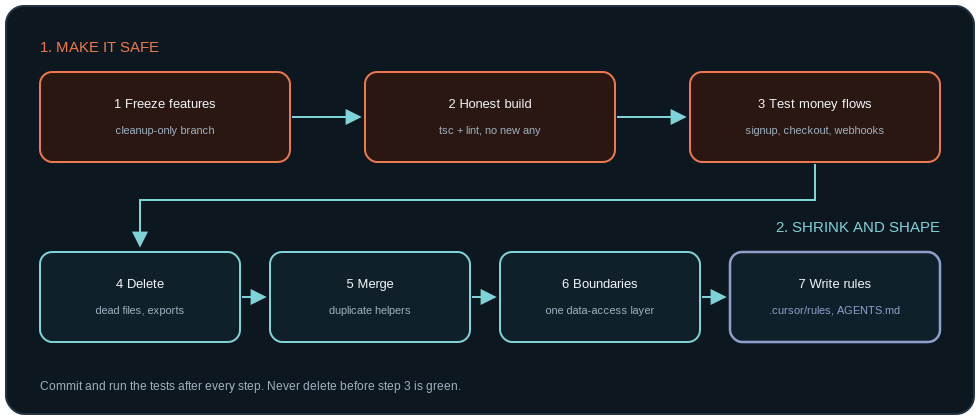
- Freeze features for a short, fixed period. Cleanup and new features in the same branch make every diff impossible to review.
- Make the build honest. Turn on strict type checks and linting, and get them passing without new
anyor ignore comments. This is your baseline. - Test the flows that make money. Sign-up, login, checkout, billing webhooks and anything that touches permissions. A handful of end-to-end tests here is worth more than hundreds of unit tests elsewhere.
- Delete dead code. Unused files, exports and dependencies. Less code means less context for the next AI session to misread.
- Merge duplicates. Pick the best version of each helper, point every caller at it, and delete the rest.
- Set boundaries. Move data access and external calls behind a small number of modules so permissions and error handling live in one place.
- Write the rules. Record the conventions you just created so Cursor follows them.
Open-source tools find most of the targets for steps 2, 4 and 5 in a JavaScript or TypeScript project:
# 1. Baseline: what is already broken
npx tsc --noEmit
npx eslint . --max-warnings=0

# 2. Unused files, exports and dependencies
npx knip

# 3. Copy-pasted blocks of 10+ lines
npx jscpd src --min-lines 10

# 4. Circular imports between modules
npx madge --circular --extensions ts,tsx src| What you find | Why it hurts | Fix |
|---|---|---|
| Three versions of one helper | Bug fixes land in one copy only | Keep one, redirect callers, delete the rest |
| Files nothing imports | The AI reads and copies them | Delete after tests pass |
| Queries inside components | Permissions checked in many places, or none | Move behind one data-access module |
| any and ts-ignore | Type errors hide real bugs | Type the boundary first, then work inward |
| Secrets in client code | Anyone can read them in the browser | Rotate, move to the server, add a check in CI |
Cursor itself is useful during cleanup, as long as each prompt is narrow: “replace every call to formatPrice2 with formatPrice and delete formatPrice2” is reviewable; “clean up the codebase” is not. Run the tests after every accepted change.

"The best cleanup commit in an AI-built codebase is usually a deletion. Every file you remove is one less thing for the next prompt to copy."
How do you stop Cursor from making the same mess again?
Cursor reads project rules stored in .cursor/rules as .mdc files, committed with your code, and it also supports a plain AGENTS.md file in the project root. Rules are the cheapest way to make the conventions from your cleanup stick, because they travel into every session automatically. Keep them short and specific; a rule the model can follow beats a style guide it cannot.
---
description: Data access and reuse conventions
globs: src/**/*.ts,src/**/*.tsx
alwaysApply: false
---
- All database calls go through src/server/db/. Never query from components.
- Search src/lib/ before writing a new helper; extend the existing one.
- Do not add dependencies without asking first.
- Every change to billing or auth needs a test in the matching __tests__ folder.
Next to the rules, keep a one-page architecture note in the repository: which folders hold what, where data access and external calls live, how auth works, and which helpers are the canonical ones. Point the rules file at it. It helps new developers as much as it helps the model, and writing it is a good test of whether the cleanup actually produced a structure you can explain in a page.
Rules help, but they do not replace review. Add three checks to every pull request:
- Type checks, linting and the dead-code check run in CI and block the merge.
- The money-flow tests run on every change, not just before releases.
- A human reads every diff that touches auth, billing or data access.
Should you clean up or rebuild?
Clean up in place when the data model is sound and the main flows mostly work: you keep everything that already earns money and improve it step by step. Consider a rebuild only when the data model itself is wrong, or when no one can explain how payments and permissions actually work after a week of reading the code. Even then, the tests you wrote in step 3 become the specification for the new version.
Track progress with a few numbers you can rerun every week: type and lint errors, unused exports, duplicated blocks, and test coverage of the money flows. If they all move in the right direction while features keep shipping, the cleanup is working.
If you would rather not do this alone, our Cursor app rescue starts with a review of exactly these points, then fixes them in small, tested milestones at a fixed price, covered by our money-back guarantee. You keep the rules and tests, so your team and Cursor can carry on without us.
Frequently Asked Questions
Can I ask Cursor to clean up its own code?
Yes, for small, well-defined steps such as deleting an unused file or merging two named helpers, with tests running after each change. Asking it to “clean up the codebase” in one prompt usually produces a large diff that is hard to review and often breaks behavior.
Should I rewrite an AI-generated app from scratch?
Rarely. If the data model is sound and the main flows work, cleaning up in place is faster and keeps what already works. A rebuild makes sense when the data model itself is wrong, or when no one can explain how core flows such as payments or permissions actually work.
What are Cursor rules?
Project rules are instructions stored in .cursor/rules as .mdc files and committed with your code. Cursor adds them to the model’s context, so they can set conventions such as where database access lives or which helpers to reuse. Cursor also reads an AGENTS.md file for simpler setups.
How long does a cleanup take?
It depends on the size of the app and how many flows lack tests. Getting the build green and the money flows tested usually takes days, not months; deeper structural work can then be done in small steps alongside new features.
Final thoughts
A messy Cursor codebase is not a reason to abandon AI-assisted development. It is a sign the code grew faster than the guardrails around it. Clean up in a fixed order, test the flows that matter, delete more than you add, and write down the rules, so the next thousand lines Cursor writes fit the system instead of fighting it.
