In this piece
Supabase RLS Mistakes in AI-Built Apps, and How to Fix Them
AI app builders such as Lovable, Bolt and Cursor usually get Supabase Row Level Security half right: RLS is switched on, but the policies still let data leak. That is worse than it sounds, because the dashboard shows a reassuring “RLS enabled” badge while any signed-in user can read, and sometimes change, everyone else’s rows. These are the eight mistakes we find most often when we review AI-built apps, with the fix for each.
We reviewed the external references on 19 November 2026. Test every fix against your own tables with a second user before trusting it.
Want someone to check your policies before your users do?
Get a security reviewWhy AI builders get RLS wrong
When a table has Row Level Security enabled and no policies, nothing can be read through the API. The app breaks, the builder is asked to “fix the error”, and the quickest fix is a policy broad enough to make the error disappear. The app works again, and the data is open again. The pattern repeats for every new table.
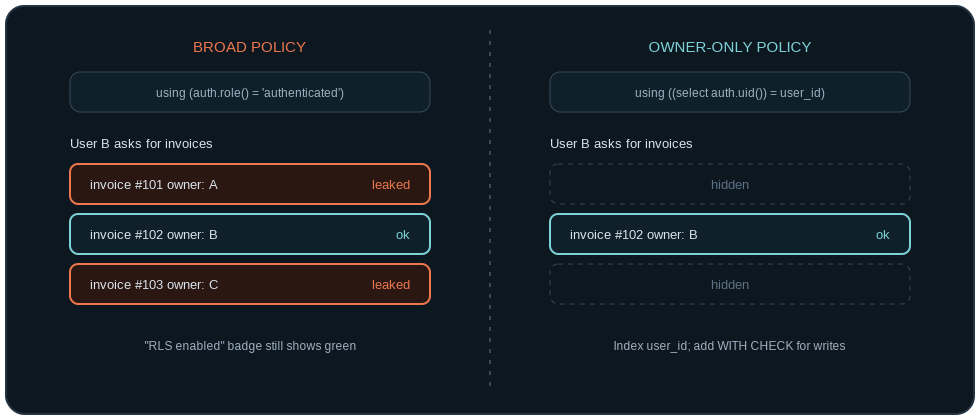
The 8 mistakes, and how to fix each
1. Policies that allow every row
using (true), or a check that only asks whether the user is signed in, gives every account access to every row. Policies should compare the row owner with the current user:
-- Mistake: every signed-in user can read every row
create policy "read" on public.invoices
  for select using (auth.role() = 'authenticated');

-- Fix: only the owner's rows
create policy "read own invoices" on public.invoices
  for select using ((select auth.uid()) = user_id);
2. Missing WITH CHECK on insert and update
using decides which existing rows a user can touch. with check decides what the row may look like after the change. Without it, a user can update their own row and set user_id to someone else’s, or insert rows on another user’s behalf.
create policy "update own invoices" on public.invoices
  for update
  using ((select auth.uid()) = user_id)
  with check ((select auth.uid()) = user_id);
3. Roles read from user_metadata
A signed-in user can change their own user_metadata from the browser. A policy that grants admin rights when user_metadata.role = 'admin' lets anyone make themselves an admin. Keep roles in app_metadata, which only your server can set, or in a roles table that users cannot write to.
4. Views that bypass RLS
A Postgres view runs with its owner’s permissions by default, so a dashboard view can return rows the user could never read from the table. On Postgres 15 and later, create views with security_invoker so the caller’s policies apply:
create view public.invoice_totals
  with (security_invoker = true) as
  select user_id, sum(amount) as total
  from public.invoices
  group by user_id;
5. Security-definer functions with no checks
Functions declared security definer run with elevated rights and skip RLS. That is sometimes needed, but every such function must check who is calling it and what they may touch, and should not live in a schema the API exposes unless it is meant to be called.
6. The service_role key in the front end
The service_role key bypasses RLS completely. If it ever reached the browser bundle, every policy is irrelevant. Rotate it, and keep it only in Edge Functions or your backend.
7. Storage buckets without policies
Files have their own policies in Supabase Storage. Uploads such as invoices, IDs or private photos need a private bucket, a policy that ties each file path to its owner, and signed URLs for downloads.
8. Policies that are correct but slow
A policy that calls auth.uid() directly can be evaluated once per row. Supabase’s own performance guide recommends wrapping it as (select auth.uid()) so it runs once per query, and indexing the column the policy filters on:
create index if not exists invoices_user_id_idx
on public.invoices (user_id);| Mistake | What an attacker can do | Fix |
|---|---|---|
| using (true) | Read every user’s rows | Compare owner with (select auth.uid()) |
| No WITH CHECK | Write rows as another user | Add with check on insert and update |
| user_metadata roles | Make themselves admin | Roles in app_metadata or a table |
| Owner-rights views | Read hidden rows through the view | security_invoker = true |
| service_role in client | Skip every policy | Rotate; server-side only |

"The green ‘RLS enabled’ badge is the most misleading thing in the dashboard. It tells you the lock is fitted, not that the door is closed."
How to test your policies in 15 minutes
- Create two test accounts, A and B, and add some data as A.
- Sign in as B and try to read A’s rows in every screen of the app.
- With B’s session, call the Supabase API directly with the anon key and try select, insert, update and delete on A’s rows.
- Try to change B’s own role or user_id fields.
- Run the Supabase security advisor and fix every warning it lists.
If anything in steps 2 to 4 succeeds, you have found a policy bug before your users did. If you would rather hand this to someone, our vibe coding rescue starts with exactly this review, at a fixed fee, covered by our money-back guarantee.
Frequently Asked Questions
Is enabling RLS in Supabase enough to secure my data?
No. Enabling RLS with no policies blocks everything, so builders often add a broad policy to make the app work again. The policy is what decides who sees what, and broad policies such as using (true) make RLS meaningless.
Why should I not use user_metadata in RLS policies?
Signed-in users can update their own user_metadata from the client. If a policy trusts a role stored there, a user can give themselves that role. Keep roles in app_metadata, which only the server can change, or in your own table.
Do Postgres views respect Row Level Security in Supabase?
Not by default. A view runs with the permissions of its owner, so it can return rows the user could not read directly. On Postgres 15 and later, create views with security_invoker = true so the caller’s RLS applies.
How do I test my Supabase RLS policies?
Create two test users. Sign in as the second and try to select, insert, update and delete the first user’s rows, both in the app and with direct API calls using the anon key. Every attempt that succeeds is a policy bug.
Final thoughts
Row Level Security is the real security model of a Supabase app, and AI builders write it under pressure to make errors go away. Read every policy, test it as a second user, and treat the RLS badge as the start of the check, not the end of it.
