In this piece
How to Build an MCP Server for Your SaaS (with Code)
An MCP server is how you let AI assistants such as Claude, ChatGPT and Cursor use your SaaS product directly: search records, read reports or create items on the user’s behalf, with that user’s permissions. The Model Context Protocol gives every assistant the same way to discover and call your features, so you build one integration instead of one plugin per assistant. This guide walks through a working TypeScript server with the official SDK, how to put it online behind OAuth for your customers, how to test it, and which tools a SaaS should expose first. The code is short, and every example below was type-checked against the current SDK; the production work is in authorization, tenant isolation and tool design. If you would rather have it built, see our MCP server development service.
We reviewed the external references on 19 November 2026, against specification revision 2026-07-28 and version 2 of the official TypeScript SDK. MCP moves quickly; check the SDK release notes before you copy code.
Planning an MCP server for your product?
Plan your MCP serverWhat is an MCP server, and does your SaaS need one?
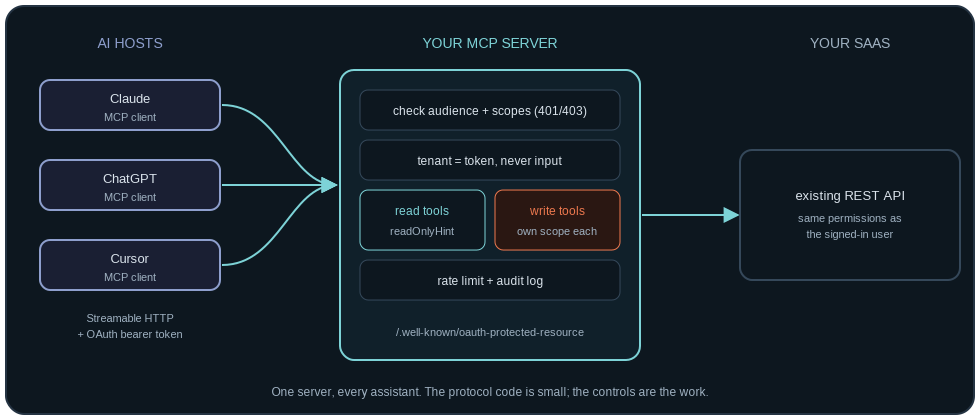
In the MCP specification, a host (the AI app) runs a client that talks JSON-RPC to your server. Your server offers three kinds of features: tools the model can call, resources it can read as context, and prompts, which are templates the user picks. For a SaaS, tools do most of the work. You need a server when customers already paste data from your product into AI assistants, or when they ask whether you “work with” the assistant they use.
How do you build an MCP server in TypeScript?
The official TypeScript SDK is now at version 2 and split into packages. The server lives in @modelcontextprotocol/server; version 1 code that imports @modelcontextprotocol/sdk still works but follows the older API.
npm install @modelcontextprotocol/server zod
# for a hosted server over HTTP, add:
npm install @modelcontextprotocol/express @modelcontextprotocol/node express
A tool is a name, a description the model reads, an input schema, and a handler. The SDK validates every call against the schema before your handler runs, and returns a readable error the model can correct. Declaring an output schema lets clients use the result as structured data, and readOnlyHint tells the client it is safe to call without a confirmation prompt.
import { McpServer } from '@modelcontextprotocol/server';
import { serveStdio } from '@modelcontextprotocol/server/stdio';
import * as z from 'zod/v4';
import { findInvoices } from './billing.js'; // your existing data layer

serveStdio(() => {
  const server = new McpServer({ name: 'acme-billing', version: '1.0.0' });

  server.registerTool(
    'search-invoices',
    {
      title: 'Search invoices',
      description: 'Find invoices for one customer. Read-only. Use before answering billing questions.',
      inputSchema: z.object({
        customerId: z.string().describe('Customer ID, e.g. cus_123'),
        status: z.enum(['open', 'paid', 'overdue']).default('open'),
      }),
      outputSchema: z.object({
        invoices: z.array(z.object({ id: z.string(), amount: z.number(), status: z.string() })),
      }),
      annotations: { readOnlyHint: true },
    },
    async ({ customerId, status }) => {
      const rows = await findInvoices(customerId, status);
      const output = { invoices: rows.map(({ id, amount, status }) => ({ id, amount, status })) };
      return {
        content: [{ type: 'text', text: JSON.stringify(output) }],
        structuredContent: output,
      };
    },
  );

  return server;
});
This server talks over stdio: the AI client launches it as a local process, which suits developer tools and internal use. Write logs to stderr, not stdout, because stdout carries the protocol messages.
When to add resources and prompts
Add a resource when there is reference material the model should read but not act on, such as your API changelog, a customer’s plan limits or a report the user opened. Add a prompt when users repeat the same multi-step request, such as “prepare my month-end billing summary”, and you want it to start the same way every time. Both are optional. Many good SaaS servers ship with tools only and add the others once real usage shows a need.
How do you test an MCP server?
Use the MCP Inspector. The web version lets you list tools and call them by hand; the CLI version runs the same checks in CI.
npx tsx server.ts   # quick run
npx @modelcontextprotocol/inspector npx tsx server.ts
npx @modelcontextprotocol/inspector --cli npx tsx server.ts --method tools/list
Then test with a real model. Ask the questions your customers would ask and watch which tool it picks. If it picks the wrong one, the fix is usually a clearer tool name or description, not more code.
How do you put it online for customers, with OAuth?
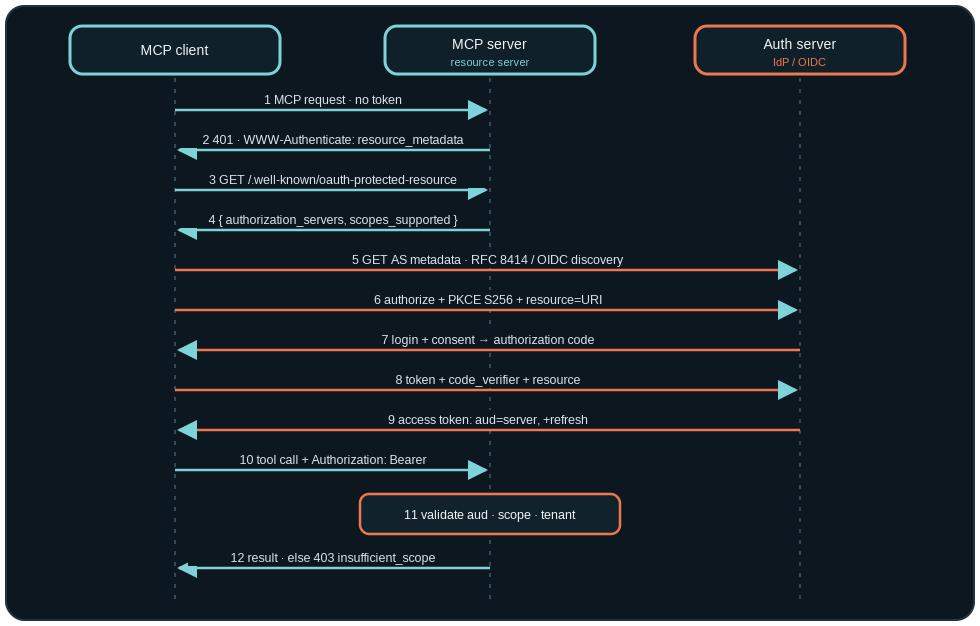
Customers connect to a hosted server over Streamable HTTP. The authorization specification makes your server an OAuth 2.1 resource server: it must publish protected resource metadata, accept only tokens issued for itself, answer 401 or 403 with a WWW-Authenticate challenge, and never pass a client’s token on to other APIs. The SDK’s Express helpers do most of this for you; you supply a verifier for your identity provider’s tokens.
import {
  createMcpExpressApp,
  getOAuthProtectedResourceMetadataUrl,
  requireBearerAuth,
  type OAuthTokenVerifier,
} from '@modelcontextprotocol/express';
import { toNodeHandler } from '@modelcontextprotocol/node';
import { createMcpHandler, McpServer } from '@modelcontextprotocol/server';
import * as z from 'zod/v4';
import { verifyJwt, findInvoices } from './lib.js'; // your IdP's JWT check and data layer

const mcpServerUrl = new URL('https://mcp.example.com/mcp');

const verifier: OAuthTokenVerifier = {
  async verifyAccessToken(token) {
    const claims = await verifyJwt(token); // signature, issuer, expiry
    return {
      token,
      clientId: claims.client_id,
      scopes: claims.scope.split(' '),
      expiresAt: claims.exp,
      resource: new URL(claims.aud), // checked against expectedResource
      extra: { accountId: claims.account_id },
    };
  },
};

const handler = createMcpHandler(() => {
  const server = new McpServer({ name: 'acme-billing', version: '1.0.0' });
  server.registerTool(
    'search-invoices',
    {
      description: 'Find invoices for one customer of the signed-in account.',
      inputSchema: z.object({ customerId: z.string() }),
      annotations: { readOnlyHint: true },
    },
    async ({ customerId }, ctx) => {
      const accountId = String(ctx.http?.authInfo?.extra?.accountId); // tenant from the token, never from input
      const rows = await findInvoices(accountId, customerId);
      return { content: [{ type: 'text', text: JSON.stringify(rows) }] };
    },
  );
  return server;
});

const app = createMcpExpressApp({ host: '0.0.0.0', allowedHosts: ['mcp.example.com'] });
const node = toNodeHandler(handler);
const auth = requireBearerAuth({
  verifier,
  requiredScopes: ['invoices:read'],
  expectedResource: mcpServerUrl,
  resourceMetadataUrl: getOAuthProtectedResourceMetadataUrl(mcpServerUrl),
});

app.all('/mcp', auth, (req, res) => void node(req, res, req.body));
app.listen(3000);
Three details matter. The tenant comes from the verified token, never from tool input. expectedResource rejects tokens minted for another service, so keep @modelcontextprotocol/express current (the SDK docs note an early 2.0 release skipped this check). And allowedHosts keeps DNS-rebinding protection on once you bind to a public interface. Mount mcpAuthMetadataRouter from the same package to serve the discovery documents. The full sequence looks like this:
Which tools should a SaaS expose first?
| Rule | Why |
|---|---|
| Start with three to five read-only tools | Search, get and summarize cover most early questions with no risk of damage |
| Design tools around tasks, not endpoints | One “find overdue invoices” tool beats four raw CRUD calls the model must chain |
| Scope each write tool separately | A token for invoices:read should not be able to send or refund anything |
| Mark destructive tools | Annotations such as destructiveHint let clients ask the user first |
| Return small, structured results | Paginate and trim fields; large dumps cost tokens and confuse the model |
| Rate-limit and log every call | Agents retry and loop; an audit log shows who did what through which client |
The mistake we see most often is wrapping every API endpoint as a tool on day one. The model then has to choose between dozens of similar tools, picks the wrong one, and chains calls that a single task-shaped tool would have done in one step. Fewer, clearer tools give better answers and a smaller security surface. Write each tool description as if for a new colleague: what it does, when to use it, and what it will not do.

"Writing the first MCP tool takes an afternoon. Deciding which tools a model should never get, and for which customer, is the part that deserves a design review."
How Devoun builds MCP servers
Our MCP server development starts with a Discovery valued at $400, 50% free (you pay $200, credited to the build): we choose the tools, scopes and tenant model with you and test the plan against real questions. The build follows in fixed-price milestones with written acceptance criteria, including OAuth, rate limits, audit logs and an Inspector test suite in your CI. A milestone that is not accepted is refunded under our money-back guarantee, and the code lives in your repository.
Frequently Asked Questions
What language should I build an MCP server in?
Use the language your API team already works in. There are official SDKs for several languages; this guide uses TypeScript because many SaaS backends run on Node.js and the TypeScript SDK is one of the most complete.
Should my MCP server use stdio or Streamable HTTP?
Stdio is for a server that runs on the user’s own machine, launched by their AI client. Streamable HTTP is for a hosted server your customers connect to over the internet. A SaaS product almost always needs Streamable HTTP with OAuth.
Can my MCP server just accept our existing API keys?
For a hosted server, the specification asks for OAuth: the server acts as a resource server, publishes protected resource metadata and only accepts tokens issued for itself. It must not pass a client’s token through to other APIs. Keys from the environment are the norm only for local stdio servers.
How long does it take to build an MCP server for a SaaS?
A read-only prototype with a few tools takes days. A production server with OAuth, tenant scoping, rate limits, audit logs and tests takes longer, mostly because of the authorization and security work.
Final thoughts
An MCP server is a small amount of protocol code in front of the API you already have. Start with a few read-only, task-shaped tools, test them with the Inspector and a real model, then put them behind OAuth with the tenant taken from the token. Add write tools one scope at a time, once you can see in the logs how customers actually use the read ones.
