In this piece
How to Move a Replit App to AWS or Vercel
Replit Agent can build and deploy a full-stack app without you leaving the browser. The convenience comes from Replit-specific services: Secrets, storage, a managed database and Replit’s own deployments. Moving to AWS or Vercel means finding every one of those and replacing it before you switch traffic. This is the order we follow when we move a Replit app for a client.
We reviewed the external references on 19 November 2026. Replit, AWS and Vercel change their dashboards often, so follow the current screens for each step.
Rather have the migration planned and run for you?
Plan your migrationWhy teams move off Replit
- They need a specific cloud region, compliance setup or private network.
- Costs or limits no longer fit as traffic grows.
- Background jobs, queues or websockets need infrastructure Replit does not suit.
- Investors or enterprise customers ask where and how the app is hosted.
Step 1: Inventory every Replit dependency
Before changing anything, write down how the app actually runs today. Replit offers several deployment types (Autoscale, Reserved VM, Static and Scheduled), and the file system of a deployment does not keep data between deploys, so check where anything is being saved.
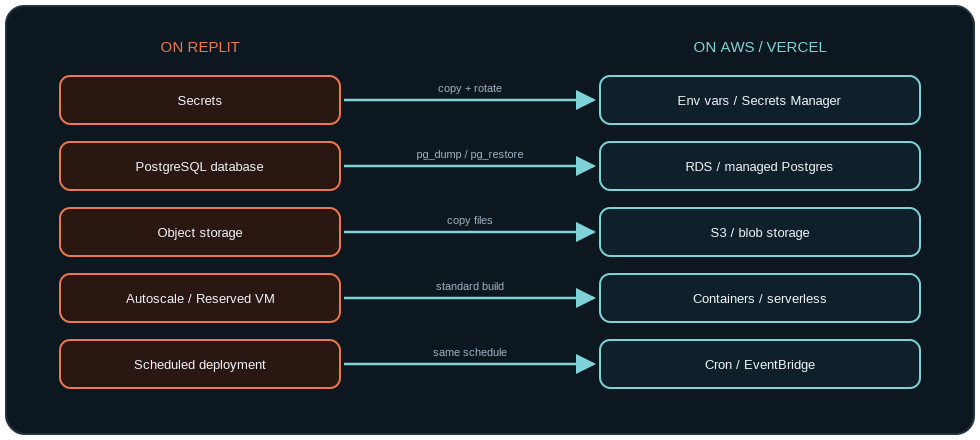
| On Replit | On Vercel | On AWS |
|---|---|---|
| Secrets | Environment variables | Secrets Manager or Parameter Store |
| PostgreSQL database | A managed Postgres (via the Marketplace) | Amazon RDS or Aurora |
| Object storage | Blob storage | Amazon S3 |
| Autoscale deployment | Serverless functions | App Runner, ECS or Lambda |
| Scheduled deployment | Cron jobs | EventBridge Scheduler |
Step 2: Choose the right host
Vercel is a good fit when the app is mostly front end, such as a Next.js or React app with short API calls. Choose AWS, or a container host, when the app runs a long-lived server, background workers, websockets or heavy processing. Moving a long-running Express or Flask server onto serverless functions is a rewrite, not a migration, so plan for it if you choose that route.
Step 3: Put the code in GitHub and make it build anywhere
Push the project to a GitHub repository. Pin the language version, list every dependency, and replace the Replit run command with standard build and start scripts. Then build and run it on your own machine with only the environment variables you have written down. Anything that fails here would have failed in production.
Step 4: Move secrets and configuration
Copy each secret into the new host’s settings, such as Vercel environment variables or AWS Secrets Manager. Rotate any key that was ever shared in a chat, a screenshot or the code itself.
Step 5: Export and restore the database
For PostgreSQL, use pg_dump against the production connection string and restore into the new database. Data in Replit’s key-value store needs a short script to export it as JSON and load it into a real table.
# Export from the Replit production database
pg_dump --format=custom --no-owner --no-acl \
  "$REPLIT_DATABASE_URL" > app.dump

# Restore into the new database
pg_restore --no-owner --no-acl \
  --dbname "$NEW_DATABASE_URL" app.dump
Then compare row counts on both sides before trusting the copy:
-- Run on both databases and compare
select 'users' as table_name, count(*) from users
union all
select 'orders', count(*) from orders;
Step 6: Rehearse, then cut over
- Deploy to the new host on a staging domain and test the main user journeys.
- Lower the DNS time-to-live a day before the switch.
- Freeze writes briefly, run the final database sync and compare counts.
- Switch DNS, watch errors and logs for an hour, and keep Replit running as a fallback for a few days.

"Migrations fail on the thing nobody wrote down. Spend the first day listing how the app really runs, and the move itself becomes boring, which is exactly what you want."
When to get help
If the app has paying users, stores personal data or needs zero downtime, a rehearsed migration is worth the planning. Devoun’s Replit app rescue includes the inventory, the move and a staging rehearsal, at a fixed price covered by our money-back guarantee.
Frequently Asked Questions
Can I move an app built with Replit Agent off Replit?
Yes. The code is yours. Push it to GitHub, replace Replit-specific services with portable ones, export the database and deploy it on the host you choose.
Should I move my Replit app to Vercel or AWS?
Vercel fits apps that are mostly front end with short serverless API calls, such as Next.js apps. AWS or a container host fits apps with long-running servers, background workers, websockets or heavy compute.
How do I move the database from Replit?
For a PostgreSQL database, export it with pg_dump using the production connection string, restore it into the new database, and compare row counts before you switch traffic. Data in Replit’s key-value store needs a small export script.
Will moving off Replit cause downtime?
It does not have to. Rehearse the migration on a staging copy, freeze writes briefly during the final data sync, then switch DNS. Keep the Replit deployment running until the new host is verified.
Final thoughts
Leaving Replit is not hard; leaving it blind is. Inventory first, choose the host that matches how your app actually runs, rehearse the move on staging, and keep the old deployment alive until the new one has proved itself.
