In this piece
Adding an AI Assistant to Your Existing SaaS Product
To add AI to a SaaS product that already has paying users, do not start with the model. Start with one job the assistant does better than your current screens, such as answering “how do I…” questions from your docs, or finding and summarising records a user would otherwise filter by hand. Then connect the assistant to your product through tools that call your existing API with the signed-in user’s own permissions, so it can never see more than that user can. Put a usage limit on every tenant, log tokens per request, and do not launch until the assistant passes an evaluation set built from real customer questions. A read-only assistant first, actions with a confirmation step second. This is the order we follow when we build AI features into existing products, and it keeps the risky parts small.
We reviewed the external references on 19 November 2026. Model features and prices change quickly; check the provider documentation linked below before you commit to a design.
Planning an assistant for your product and want a second opinion on the design?
Scope your AI assistantWhat should an AI assistant in a SaaS product actually do?
“Add a chatbot” is not a feature. The assistants that earn their place do one of a few clear jobs, and each job has a different build and a different risk. Pick one for the first release.
| Assistant job | What it needs | Main risk |
|---|---|---|
| Answer product questions | Retrieval over help docs and release notes | Confident answers about features you do not have |
| Find and summarise the user’s data | Read-only tools into your API | Showing one tenant another tenant’s records |
| Draft content (emails, reports, replies) | Templates, the user’s data, an edit step | Sending something the user did not check |
| Take actions (update, create, schedule) | Write tools, confirmation UI, audit log | Doing the wrong thing at scale |
Anthropic’s engineering team makes the same point in Building effective agents: find the simplest solution that works, and add complexity only when it clearly pays for itself. For most SaaS products, a single model call with good retrieval and a few well-defined tools beats a free-roaming agent.
How do you add an AI assistant to an existing SaaS app?
The architecture is the same whichever provider you use. The browser talks to your backend, never directly to the model. Your backend builds the prompt, calls the model, and, when the model asks for a tool, runs that tool itself. Both Claude’s tool use and OpenAI’s function calling work this way: the model returns a structured request, and your application decides whether and how to run it.
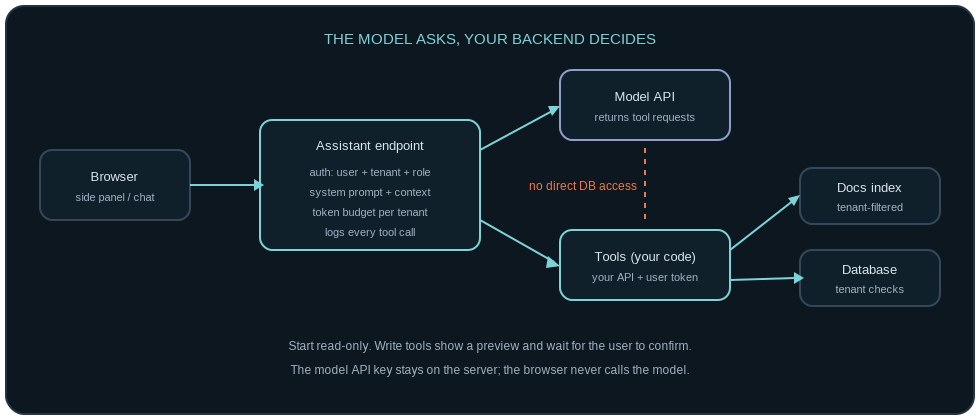
- Add an assistant endpoint to your backend. It authenticates the user, loads their tenant and role, and holds the model API key. The key never reaches the browser.
- Write a short system prompt. What the assistant is for, what it must refuse, and how it should say “I don’t know”.
- Expose a few narrow tools. Each tool wraps an endpoint you already have. Start read-only.
- Add retrieval for docs. Index your help centre and release notes so product answers come from your own text, with links.
- Stream the answer into a UI that fits your product: a side panel or a command bar usually works better than a floating chat bubble.
A minimal tool definition, and the server code that runs it, looks like this:
// A tool the model may call. The model only chooses the arguments;
// your server runs it with the signed-in user's own session.
const tools = [
  {
    name: 'search_invoices',
    description: 'Find invoices the current user can see. Read-only.',
    input_schema: {
      type: 'object',
      properties: {
        status: { type: 'string', enum: ['open', 'paid', 'overdue'] },
        customer: { type: 'string' },
      },
    },
  },
];

async function runTool(name: string, input: unknown, session: Session) {
  if (name === 'search_invoices') {
    // Same API, same tenant and role checks as the UI. No raw SQL, no admin key.
    return api.invoices.search(input, { token: session.accessToken });
  }
  throw new Error('Unknown tool');
}
How do you keep each customer’s data private?
This is where most first attempts go wrong. If the model can query the database with a service account, one cleverly worded question can pull another customer’s data into the answer. OWASP lists this as sensitive information disclosure and the broader problem of tools with too much power as excessive agency. The fix is architectural, not a better prompt:
- Tools run with the signed-in user’s token, so your existing tenant and role checks apply.
- No tool takes a raw SQL string, a URL to fetch, or a tenant ID chosen by the model.
- Write actions show a preview and need a click from the user before anything changes.
- Every tool call is logged with the user, tenant, arguments and result size.
- Your retrieval index stores the tenant with every chunk and filters on it before ranking.
Then test it the boring way: sign in as a user in tenant B and ask, in as many ways as you can think of, for tenant A’s data. Any success is a launch blocker.

"The model is the easy part to change. The permissions model is the part you cannot afford to get wrong, so the assistant should borrow the one your product already has."
What does an AI assistant cost to run?
The build cost is mostly integration and testing work. The running cost is mostly model tokens: every request pays for the system prompt, the retrieved context, the conversation so far, the tool results and the answer. Token prices differ by model and change often, so use the provider’s own page, such as Claude’s pricing, rather than a number from a blog post. What you control is how many tokens each request uses and how many requests a tenant can make. OWASP calls runaway usage unbounded consumption, and it is a billing risk as much as a security one.
- Set a monthly token budget per tenant and per plan, and show usage in the admin settings.
- Trim conversation history and retrieved context; most answers do not need the whole thread.
- Route simple requests to a smaller model and keep the larger one for hard questions.
- Cache answers to common product questions.
- Decide early whether AI is in every plan, an add-on, or usage-based, before customers get used to free.
For a fuller cost breakdown, see our line-by-line guide to AI agent development cost.
How do you know the assistant is ready to launch?
Collect 50 to 100 real questions from support tickets, sales calls and search logs, write the answer a good support agent would give, and run the assistant against that set on every change to the prompt, the tools or the model. Track the share of correct answers, wrong answers and honest “I don’t know” replies. Add the cross-tenant tests from above to the same set. Launch to a few friendly customers behind a feature flag, read the conversations every week, and add each failure to the evaluation set.
How Devoun does it: we start with a paid Discovery ($200, credited to the build) that picks the assistant’s job, maps the tools onto your API and writes the first evaluation set. The build then runs in fixed-price milestones through our AI development service, each one covered by our money-back guarantee: if a milestone is not accepted, you do not pay for it.
Frequently Asked Questions
Do I need to fine-tune a model to add an AI assistant to my SaaS?
Usually not. Most in-product assistants work with a hosted model, a clear system prompt, retrieval over your help content and tool calls into your own API. Fine-tuning is worth testing later, once you have an evaluation set that shows where the base model falls short.
How do I stop the assistant from showing one customer another customer’s data?
Never give the model a database connection. Give it tools that call your existing API with the signed-in user’s token, so the same tenant and role checks that protect your UI also protect the assistant. Test it by asking, as user B, for user A’s records.
How much does it cost to run an AI assistant in a SaaS product?
Running cost is mostly model tokens, which depend on how many requests you serve, how much context each request carries and which model you pick. Prices change often, so check the provider’s pricing page, set per-tenant usage limits and log tokens per request from day one.
Should the assistant be able to take actions, or only answer questions?
Start read-only. Once answers are reliable, add actions one at a time, show the user exactly what will change and ask them to confirm before anything is written, sent or deleted.
Final thoughts
An AI assistant is not a separate product bolted onto yours. It is a new way into the product you already have, and it should obey the same rules. Pick one job, borrow your existing permissions, cap the cost, and let a real evaluation set decide when it ships.
