In this piece
Connecting AI Agents to Your CRM and ERP
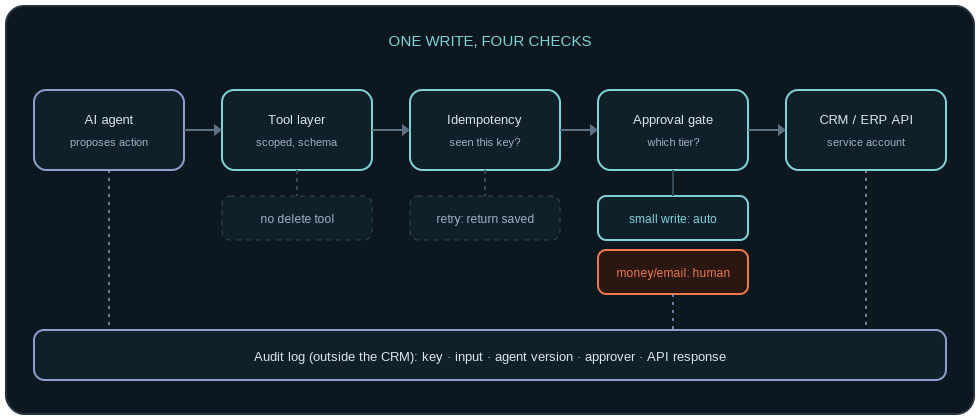
The safe way to connect an AI agent to your CRM or ERP is through a thin tool layer you control, not by handing the model an admin API key. The agent asks for an action, such as “add a note to this contact” or “draft an invoice for order 4471”; your code checks whether that agent may do it, whether the request is a duplicate, and whether a person must approve it first, and only then calls the CRM or ERP API. Every step is logged. Built this way, an agent can save your team hours of copy-and-paste between systems without becoming the one user who can quietly change everything. This is how we build AI workflow automation for US companies: reads are open, small writes are automatic, and anything that moves money or talks to a customer waits for a human. The sections below walk through access, permissions, idempotency, approval and audit logs in the order you should set them up.
We reviewed the external references on 19 November 2026. Vendor APIs change often; check your CRM’s and ERP’s own developer documentation for the exact scopes and limits.
Planning an agent that touches Salesforce, HubSpot, NetSuite or Odoo?
Plan your integrationHow should an AI agent connect to a CRM or ERP?
Through the system’s official API, wrapped in a small set of tools that each do one narrow thing. Avoid two shortcuts: letting the agent drive the web interface like a person, and exposing a generic “call any endpoint” tool. Both give the model far more reach than the task needs, which is exactly the risk OWASP describes as excessive agency: too much functionality, too many permissions or too much autonomy.
A good tool is boring. It has a clear name, a description that says what it cannot do, and a strict input schema, so the model cannot slip in extra fields:
{
  "name": "crm_add_note",
  "description": "Add a note to an existing contact. Cannot create or delete contacts.",
  "input_schema": {
    "type": "object",
    "properties": {
      "contact_id": { "type": "string" },
      "note": { "type": "string", "maxLength": 2000 }
    },
    "required": ["contact_id", "note"]
  }
}
If several assistants need the same tools, for example a sales agent, a support agent and your team’s chat assistant, it can make sense to publish them once through the Model Context Protocol (MCP). An MCP server is still your code: the permission checks, approvals and logs described below live inside it, not in the model.
What permissions should an AI agent have in your CRM?
Its own, and as few as possible. Create a dedicated integration user or connected app for the agent, never a person’s login and never an admin key. Use OAuth where the vendor supports it, because OAuth 2.0 scopes let you grant access object by object and revoke it without rotating anyone else’s credentials. Two side benefits: the agent’s changes show up under its own name in the CRM history, and you can switch it off in one click.
Then sort every action into one of four tiers before you write any code:
| Tier | Examples | Control |
|---|---|---|
| Read | Look up a contact, order status, stock level | Automatic; filter fields the agent does not need |
| Small, reversible write | Add a note, set a follow-up date, tag a lead | Automatic, logged, rate-limited |
| Consequential write | Create an invoice, change a price, update a credit limit, email a customer | Agent drafts, a named person approves |
| Never | Delete or merge records, change user roles, bulk exports | No tool exists for it |
The “never” row matters most. If no tool can delete a customer record, no prompt injection hidden in an email or a support ticket can make the agent delete one.
Reads deserve care too. An agent that can read every field will happily paste a customer’s full history, notes and payment terms into a reply. Return only the fields each tool needs, mask things like bank details and tax IDs, and keep the agent’s view of the ERP to the records its job requires: a sales agent rarely needs payroll or supplier pricing. Finally, respect the vendor’s API limits. CRM and ERP APIs usually cap requests per day or per minute, and an agent stuck in a loop can use up the quota your other integrations depend on. Put a per-agent rate limit in your tool layer so the agent hits your limit long before it hits the vendor’s.
How do you stop an agent from creating duplicate records?
Agents retry. A network call times out, the model loops, or a workflow runs twice, and without protection you get two invoices for one order. The fix is idempotency: build a key from the business input, check it before writing, and pass it to the API when the API supports it. Stripe’s documentation on idempotent requests is a clear model: the server saves the result of the first request for a key and returns that same result on retries. Many CRM and ERP APIs do not offer this, so keep your own record of keys and results:
// Every write the agent proposes goes through one function.
async function createInvoice(p: InvoiceProposal, ctx: AgentContext) {
  // Same business input, same key: a retry can never create a second invoice.
  const key = `invoice:${p.orderId}:v${p.revision}`;

  const done = await audit.findByKey(key);
  if (done) return done.result;

  if (p.total > ctx.policy.autoApproveLimit) {
    return approvals.request({ key, proposal: p, reason: 'over auto-approve limit' });
  }

  const result = await erp.post('/invoices', p, { headers: { 'Idempotency-Key': key } });
  await audit.record({ key, actor: ctx.agentId, input: p, result, approvedBy: null });
  return result;
}
For contacts and deals, add a “find before create” step that searches by email, phone or external ID. Duplicate contacts are the most common mess an agent leaves behind, and they are tedious to merge later.
Before and alongside Devoun, our founder worked as an ERP integration developer on a Shopify-to-Odoo apparel integration (a prior role) that connected online sales with inventory, manufacturing orders, bills of materials, invoicing and payments. Much of that work was about order reprocessing and keeping Shopify orders consistent with the ERP records downstream. An agent adds one more writer to that picture, which makes the same discipline more important, not less.

"The question is never whether the agent is smart enough to update the ERP. It is what happens on the day it is wrong, and whether you can see it, stop it and undo it."
When should a human approve an agent’s action, and what should you log?
A person should approve anything in the consequential tier. Keep the approval quick: show the approver the proposed change as a before-and-after, the reason the agent gave, and the source it used, with approve, edit and reject buttons in the tool your team already uses. Approvals that take ten clicks get rubber-stamped, which is worse than no approval at all.
The audit log is what lets you trust the system later. For every action, record:
- The idempotency key, the tool name and the exact input the agent proposed.
- Which agent and which version of its prompt and model made the proposal.
- Who approved, edited or rejected it, and when.
- The API response, including errors, and the ID of the record created or changed.
Store the log outside the CRM, where the agent cannot write. Review a sample each week for the first months; the rejected and edited proposals tell you exactly where the agent needs better instructions or tighter tools.
What does a safe rollout look like?
- Start read-only. Let the agent answer questions from CRM and ERP data for two weeks.
- Turn on small, reversible writes with daily limits and watch the audit log.
- Run consequential actions in draft mode: the agent proposes, people approve every one.
- Raise auto-approve limits only where the rejection rate stays near zero for weeks.
- Keep a kill switch: one setting that revokes the agent’s token and pauses every queue.
How Devoun can help: our AI workflow automation work starts with a Discovery (valued at $400, you pay $200, credited to the build) that maps your CRM and ERP actions into these tiers and fixes the price of the build. Milestones are fixed price and covered by our money-back guarantee: if a milestone is not accepted, you do not pay for it.
Frequently Asked Questions
Can I give an AI agent my CRM admin API key?
You should not. Create a dedicated integration user or app for the agent with only the objects and actions it needs. An admin key lets one bad instruction or prompt injection change or delete anything, and you cannot tell the agent’s actions apart from a person’s in the logs.
Do I need MCP to connect an agent to my CRM?
No. MCP is a standard way to expose tools to AI clients and is useful when several agents or assistants share the same tools. A small set of functions in your own backend works just as well for one agent. The permission, approval and logging rules are the same either way.
Which agent actions need human approval?
Anything that moves money, deletes or merges records, changes prices or credit limits, or sends messages to customers. Small, reversible updates such as adding a note or setting a follow-up date can usually run on their own, as long as they are logged.
How do I stop an agent from creating duplicate records?
Give every write a key built from the business input, such as the order number, and check it before writing. If the API supports idempotency keys, pass the same key on retries. Also search for an existing record before creating a new contact or deal.
Final thoughts
An AI agent connected to your CRM and ERP is just another integration user, one that writes faster and makes different mistakes. Give it its own narrow account, make its writes idempotent, put people in front of the actions that matter, and log everything. Do that and the agent becomes a reliable colleague instead of a risk you discover in next quarter’s reconciliation.
