In this piece
What “Production-Ready” Really Means for AI Features
“Production-ready” is the most stretched phrase in AI right now. Teams use it for a demo that impressed the board, a prototype that worked on ten hand-picked questions, or a feature that runs on a server. Our view is narrower: an AI feature is production-ready when it behaves acceptably on inputs you did not choose, and you can measure, limit and recover from the times it does not. That standard is not about the model. It is about the engineering around it: evaluation, fallbacks, guardrails, observability, versioning, cost control and a path to a human. It is what we hold our own AI development work to, and it is a useful test for any vendor’s. The general definition, for software of any kind, is in our glossary entry for production-ready; this piece is about what changes when the software is probabilistic.
We reviewed the external references on 19 November 2026. This is an opinion piece: the seven tests are how we judge readiness, not an industry standard.
Have an AI demo that needs to survive real users?
Scope your AI featureWhy do AI features that demo well fail in production?
Because a demo is a selection. The person giving it chose the inputs, knows which phrasings work and stops before the answers get strange. Real users bring typos, half-finished questions, other languages, hostile instructions and edge cases nobody imagined. Traditional software fails loudly on bad input; a language model fails quietly, with a fluent, confident and wrong answer. That is why the usual definition of production-ready (it is deployed, it is monitored, it has tests) is necessary but not enough.
| Question | Demo answer | Production answer |
|---|---|---|
| Does it work? | It worked on the examples we tried | It passed an agreed threshold on a real evaluation set |
| What happens when it is wrong? | We have not seen that yet | Fallback, handover to a human, or a safe refusal |
| Can it be tricked? | Not tested | Tested against prompt injection; tools limited to the user’s permissions |
| What did it say last Tuesday? | No idea | Logged with prompt version, model, cost and latency |
| What will it cost at 10× usage? | Unknown | Measured per request, with limits and alerts |
What does production-ready mean for an AI feature?
These are the seven tests we apply. A feature that fails any of them is, in our view, still a demo.
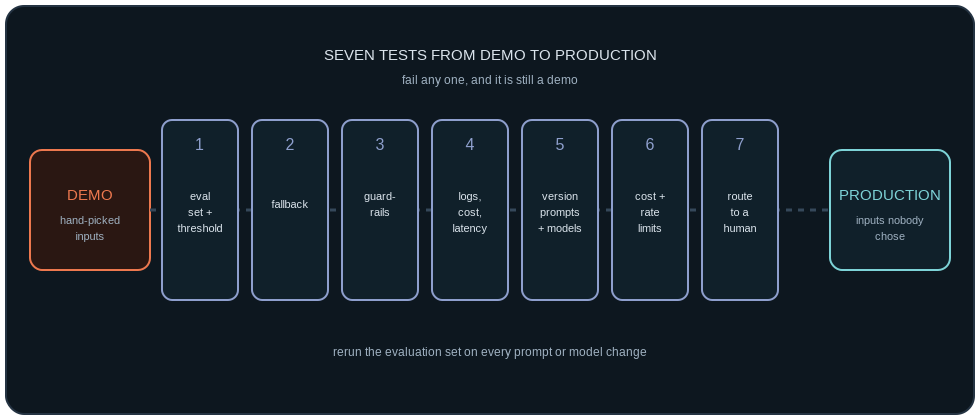
- An evaluation set with a pass threshold, agreed before testing. Built from real inputs, including the awkward ones, with the threshold written down before anyone sees the results. Otherwise the bar moves to wherever the model landed.
- A defined fallback. Timeouts, provider outages, low-confidence answers and refusals each have a planned behavior: a simpler model, a cached answer, a clear “I can’t help with that” or a handover.
- Guardrails. Prompt injection tops the OWASP Top 10 for LLM applications. The model should never hold more permissions than the user it serves, tool calls should be validated, and outputs checked before they reach customers or other systems.
- Observability. Every request logged with input, output, prompt version, model, tokens, cost and latency, with personal data handled according to your privacy policy. Without logs you cannot debug a complaint or spot drift.
- Versioning. Prompts, model names and retrieval settings are versioned like code, and every change reruns the evaluation set. Providers update models; your feature should not change behavior silently.
- Cost and rate limits. Per-user and per-day limits, alerts on spend, and a known cost per request. A loop or an abusive user should hit a ceiling, not your invoice.
- A route to a human. Users can reach a person, and high-impact actions such as payments, deletions or customer messages need approval until the evaluation data says otherwise.
None of this is new thinking. The NIST AI Risk Management Framework organizes the same ideas into governing, mapping, measuring and managing AI risk. Our seven tests are simply the version of that a small product team can check in a week.
What does a good evaluation case look like?
The evaluation set is the test that does the most work, and the one most teams skip. Each case should come from a real input and say what a good answer must and must not contain:
{
  "id": "refund-policy-017",
  "input": "I bought the annual plan 40 days ago, can I still get my money back?",
  "source": "real support ticket, anonymized",
  "expected": {
    "must_mention": ["30-day refund window"],
    "must_not": ["promise a refund", "invent a policy"],
    "action": "offer handover to a human agent"
  },
  "grader": "rubric + human spot check",
  "release_gate": "suite pass rate >= agreed threshold, zero critical failures"
}
Fifty to a few hundred cases like this, covering normal questions, edge cases and attacks, tell you more than any demo. Rerun them on every prompt or model change, and add every real failure you find in production as a new case.

"If you can’t tell me how often your AI feature is wrong, you don’t have a feature yet. You have a demo with a deploy button."
Who should own production readiness?
One named person, and not the model provider. Providers publish model cards and safety notes, but they cannot know your users, your data or the cost of a wrong answer in your product. In a small company the owner is usually the CTO or lead engineer; in a larger one, the product owner of the feature, with engineering and support involved. Their job is simple to state: keep the evaluation set current, decide when a change is allowed to ship, and read the logs every week. The common failures are rarely exotic attacks. They are a prompt changed on a Friday without rerunning the tests, a model update nobody noticed, or a spending loop nobody capped.
Is it worth the extra work?
We think so, for one reason: trust is hard to win back. A user who gets one confidently wrong answer about their money, health or contract stops relying on the feature, and often on the product. The seven tests cost days, not months, when they are planned from the start, and far more when they are bolted on after an incident. They also make the business conversation easier: “passes 95% of an agreed test set” is something a buyer can sign off; “works well in our testing” is not. That figure is an example, not a recommendation; your threshold depends on the cost of a wrong answer.
How Devoun can help: our AI development starts with a paid Discovery that defines the evaluation set and acceptance criteria before we build, then delivers in fixed-price milestones. A milestone that does not meet them is refunded under our money-back guarantee.
Frequently Asked Questions
What does production-ready mean for an AI feature?
It means the feature behaves acceptably on real, unpredictable inputs, and you can measure, limit and recover from its failures. In practice: an evaluation set with a pass threshold, fallbacks, guardrails, logging, versioning, cost limits and a route to a human.
How do I know my AI feature is ready to launch?
Agree a pass threshold on an evaluation set built from real inputs before you test, run it on the final prompt and model, and launch only if it passes. Then release to a small group first and keep measuring.
What is the biggest security risk for AI features?
Prompt injection is at the top of the OWASP Top 10 for LLM applications: text from users or documents that tricks the model into ignoring its instructions. Limit what the model can do with tools, check outputs, and never give it permissions the user does not have.
Do I need a human in the loop?
For actions that are hard to undo, such as payments, deletions or messages to customers, yes, at least at first. For low-risk answers, a clear way for the user to reach a person is usually enough.
Final thoughts
Production-ready AI is not a model choice; it is a set of promises you can check. Measure how often the feature is wrong, decide what happens when it is, and make sure someone can see and stop it. Until then, call it a demo, and launch it like one.
