In this piece
How to Build an AI Voice Agent: Stack, Latency and Cost
An AI voice agent is four services and a conductor: a phone line, speech-to-text, a language model and text-to-speech, held together by an orchestration layer that decides when the caller has finished and when to stop talking. Building a demo takes an afternoon. Building one people do not hang up on takes a strict latency budget and serious testing, because callers notice a pause long before they notice a wrong word. This guide walks through the stack, the latency budget, turn-taking and interruptions, testing and the cost per minute, so you can build it yourself or judge a proposal. It assumes you can write a small web service; everything else is explained from first principles. When you want it built for you, see our AI voice agent development service.
We reviewed the external references on 19 November 2026. Voice AI vendors, model names and prices change quickly, so this guide describes the architecture and links to official documentation instead of quoting prices.
Planning a voice agent and want a second opinion on the stack?
Scope your voice agentWhat are the parts of an AI voice agent?
- Telephony. A phone number or SIP trunk that delivers the call audio to your code. Twilio’s Media Streams, for example, sends the caller’s audio over a WebSocket as 8 kHz mu-law and lets you stream audio back.
- Speech-to-text (STT). Streaming transcription that returns partial words as the caller speaks, not a transcript after they hang up.
- Language model. Decides what to say and which tools to call: check a calendar, look up an order, transfer the call.
- Text-to-speech (TTS). Streams audio back as soon as the first words of the reply exist.
- Orchestration. Voice activity detection, end-of-turn detection, interruptions, tool calls, logging. Open-source frameworks such as Pipecat (Python) and LiveKit Agents (Python and Node.js, with telephony support) do most of this for you.
The alternative to chaining STT, model and TTS is a speech-to-speech model that takes audio in and produces audio out in one session. OpenAI, for example, documents connecting its speech-to-speech models to phone calls over SIP.
| Cascaded pipeline (STT, LLM, TTS) | Speech-to-speech model | |
|---|---|---|
| Latency | More hops; needs streaming at every stage | Fewer hops; usually faster to first audio |
| Control | Choose and tune each part; swap vendors | One vendor; less control over each step |
| Transcripts and audit | Text at every step, easy to log and test | Need separate transcription for logs |
| Voice and languages | Any TTS voice; pick STT per language | Limited to the model’s voices and languages |
Our default for a first build: an open-source orchestration framework, a telephony provider you already use, and a cascaded pipeline, because transcripts at every step make testing and debugging much easier. Keep the model, STT and TTS behind small interfaces so you can swap any of them, including for a speech-to-speech model, once your test calls show where the time and the errors actually are. Whatever you choose, keep the business logic (what the agent may book, change or reveal) in your own tools and code, not in the prompt.
How fast does a voice agent need to respond?
Faster than most teams expect. A study of turn-taking across ten languages (Stivers et al., PNAS 2009) found that people avoid overlapping and leave only short gaps between turns, typically a fraction of a second. Anything much slower feels like the line has dropped. Give every stage a budget and measure it on every call:
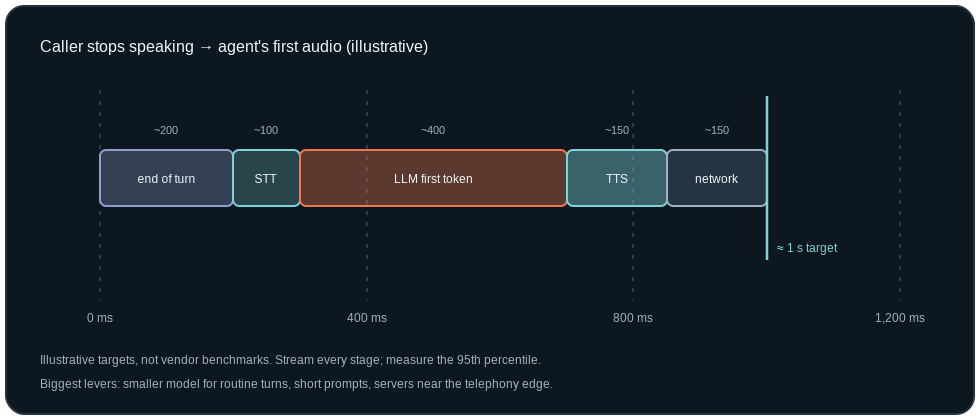
The figures in the diagram are illustrative targets, not vendor benchmarks. The rules that make them achievable: stream everything, start TTS on the first sentence of the reply, keep the system prompt short, use a smaller model for routine turns, run servers close to your telephony provider, and say a short filler such as “let me check” before a slow tool call. Track the 95th percentile, not the average: the slow calls are the ones people remember.
How do you handle turn-taking and interruptions?
Two decisions make or break the conversation. End of turn: answer too early and you cut callers off mid-sentence; wait too long and you add dead air. Combine voice activity detection with a short silence threshold, and consider a turn-detection model that also looks at the words. Barge-in: when the caller starts speaking while the agent talks, stop the audio immediately, discard the rest of the reply, and record what the caller actually heard so the model does not assume it said everything. With Twilio, that means sending a clear message to drop buffered audio:
// Server -> Twilio: play a chunk of the agent's reply
{ "event": "media", "streamSid": "MZ...",
  "media": { "payload": "<base64 mu-law, 8 kHz, mono>" } }

// Server -> Twilio: the caller interrupted, drop buffered audio
{ "event": "clear", "streamSid": "MZ..." }
Also plan for the moments that are not conversation: DTMF key presses, long holds, voicemail, transfers to a person with a summary, and a polite way to end the call.

"Callers forgive a voice agent that misunderstands and asks again. They do not forgive one that talks over them. Get interruptions right before you tune anything else."
How do you test a voice agent before real callers hear it?
- Write 30 to 50 call scripts from real calls, each with the outcome you expect (booked, transferred, answered).
- Run them automatically against every build, with a simulated caller, and check outcomes and tool calls.
- Add hard audio: background noise, speakerphone, accents, people who pause mid-sentence or speak over the agent.
- Break the tools on purpose: slow calendar, failed lookup, no human available to transfer to.
- Measure latency per stage and per call, and fail the build if the slowest calls get worse.
- Launch to a small share of calls, read transcripts daily, and add every failure to the script set.
Before launch, tell callers they are speaking to an AI, check recording consent rules for where your callers are, and confirm any outbound calling plans with your adviser.
Treat security as part of testing too. A caller can say anything, including instructions aimed at the model, so every tool the agent can call needs its own permission checks: verify who the caller is before reading or changing their records, cap what the agent can refund or cancel, and log every tool call with the transcript. Store recordings and transcripts with the same care as any other personal data, and decide up front how long you keep them.
What does it cost to build and run?
The build cost is mostly integrations, conversation design and testing, as with any AI agent. The running cost is charged per minute or per token by each vendor in the chain, so work it out per call minute from their current official pricing pages:
cost per call minute = telephony per minute
                     + speech-to-text per minute
                     + model tokens per minute (in + out)
                     + text-to-speech per minute of audio
                     + hosting and monitoring share

monthly running cost = cost per call minute × call minutes a month
Measure tokens and audio minutes on real test calls rather than guessing; tool calls and long system prompts add up quickly. If you are buying rather than building, our guide to the cost of an AI receptionist covers the subscription route.
Devoun builds AI voice agents on your phone numbers and systems, with the test scripts and latency monitoring handed over to your team. We start with a Discovery valued at $400, 50% free (you pay $200), which ends with a fixed price for the build, and every milestone is covered by our money-back guarantee.
Frequently Asked Questions
What do I need to build an AI voice agent?
A phone number or SIP trunk, speech-to-text, a language model, text-to-speech, and an orchestration layer that streams audio between them and handles turn-taking. Open-source frameworks such as Pipecat and LiveKit Agents provide the orchestration, so you can focus on the conversation and integrations.
What is a good latency for a voice agent?
In human conversation the gap between turns is usually a fraction of a second. Aim for the agent to start speaking within about a second of the caller finishing, and measure the slowest calls, not just the average, because those are the ones callers notice.
Should I use a speech-to-speech model or a cascaded pipeline?
Speech-to-speech models have fewer hops and handle tone well. A cascaded pipeline gives you more control over each part, transcripts you can check, and freedom to swap vendors. Many teams prototype with one and test the other against the same call scripts.
How much does an AI voice agent cost to run?
Running cost is charged per minute or per token across telephony, speech-to-text, the model and text-to-speech, plus hosting. Add up each vendor’s current price for one minute of a real call to get a cost per minute, then multiply by expected call minutes.
Final thoughts
The components of a voice agent are now easy to get; the experience is not. Choose a cascaded pipeline or a speech-to-speech model on purpose, give every stage a latency budget, get interruptions right, and test with real call scripts before launch. Do that, and the agent sounds like a helpful colleague instead of a slow phone menu.
