In this piece
Vibe-Coded App Security Audit Checklist
Apps built with Lovable, Bolt, Replit or Cursor usually work before they are safe. The AI builds what you asked to see: screens, flows and data. It rarely adds what nobody asked for, such as a check on who may call each server route, a rate limit on the login form or a rule for what may be uploaded, or a decision about which errors a user should see. This checklist covers the ten areas we review in every AI-built app beyond the database rules, each with a quick test you can run yourself in an afternoon and the OWASP category it belongs to, so you can find the gaps before your users, an investor’s reviewer or an attacker do. If you would rather hand it over, our vibe coding rescue starts with exactly this review.
We reviewed the external references on 19 November 2026. Run these tests only against apps you own or are authorized to test.
Want a second pair of eyes before launch?
Get a security reviewWhy do vibe-coded apps fail security reviews?
Because the risks sit in places a demo never shows. The OWASP Top 10:2025 still ranks broken access control first, and it added software supply chain failures as a new category at number three. Both are exactly where AI-generated code is weakest: the screen hides other users’ data but the route behind it does not, and packages are added because they made an error disappear. If your app uses Supabase, start with our guide to RLS mistakes; this checklist covers everything around the database.
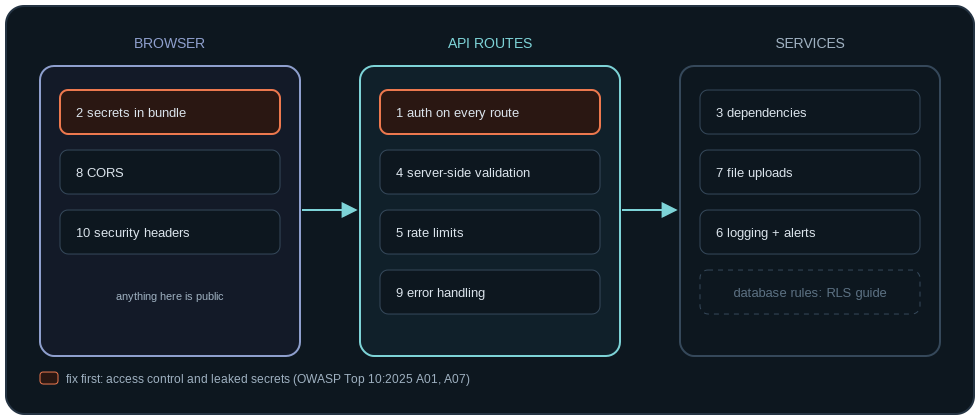
What should a vibe-coded app security audit check?
1. Authentication and access control on every route
List every API route, server action and edge function. For each, ask: does it check that a user is signed in, and that this user may act on this record? Hidden buttons are not access control. Test by calling routes directly as a second, ordinary user and with no session at all.
2. Secrets in the client
AI builders often put API keys where the browser can read them, or prefix them so the framework ships them to the client. Anything in the bundle is public. Keep secret keys on the server, rotate any that leaked, and turn on secret scanning in your repository. The OWASP Secrets Management Cheat Sheet covers storage and rotation.
3. Dependencies the AI added
Check every package in package.json: is it real, maintained and needed? AI tools sometimes suggest packages that are abandoned, misspelled or do not exist, which attackers can register. Commit the lockfile, run npm audit and remove what you do not use.
4. Input validation on the server
Form checks in the browser are for convenience; attackers skip them. Validate type, length and format again on the server with a schema, and use parameterized queries. The OWASP Input Validation Cheat Sheet recommends allow-lists over block-lists.
5. Rate limits
Login, signup, password reset, contact forms and any route that calls a paid AI model need limits. Without them you invite password guessing and surprise bills, the risk OWASP calls unrestricted resource consumption.
6. Logging and alerts
Could you tell, tomorrow, that someone downloaded every customer record tonight? Log sign-ins, permission failures and admin actions, never log passwords, tokens or full card data, and alert on spikes. The OWASP Logging Cheat Sheet lists what to record.
7. File uploads
Limit size and allowed types, check the file content and not only the extension, rename files on upload, store them outside the web root or in private storage, and serve them through signed links. The OWASP File Upload Cheat Sheet is the reference.
8. CORS
When a request fails in development, the quickest AI fix is to allow every origin. Allow only your own front ends, and never combine a wildcard or a reflected origin with credentials. MDN’s CORS guide explains the headers.
9. Error handling
Stack traces, SQL errors and internal IDs in error messages give attackers a map. Show users a generic message, log the detail on the server, and make sure a failed check denies access instead of letting the request through.
10. Security headers and configuration
Check for HTTPS everywhere, secure and HttpOnly cookies, a content security policy, debug mode off, and no admin panels or test routes left open in production.
Which quick tests can you run today?
These four commands catch a surprising share of problems. Replace the URLs with your own.
# 1. Secrets in the client bundle (run after a production build)
grep -rEo "(sk_live|sk-|service_role|SECRET|PRIVATE_KEY)[A-Za-z0-9_\-]*" dist/ .next/static/ 2>/dev/null

# 2. Known-vulnerable dependencies
npm audit --omit=dev

# 3. Does the API answer any website? (look for your own origin, not *)
curl -s -I -H "Origin: https://evil.example" https://api.yourapp.com/api/me | grep -i access-control

# 4. Is there a rate limit? (expect 429s before the end)
for i in $(seq 1 50); do curl -s -o /dev/null -w "%{http_code} " -X POST https://yourapp.com/api/login; done| Check | Quick test | OWASP Top 10:2025 |
|---|---|---|
| Auth on every route | Call routes as a second user and with no session | A01 Broken Access Control |
| Secrets | Search the production bundle for keys | A07 Authentication Failures (hard-coded credentials) |
| Dependencies | npm audit; check each package is real and used | A03 Software Supply Chain Failures |
| Input validation | Send wrong types and long strings straight to the API | A05 Injection |
| Rate limits on login | Loop failed logins; expect 429s or growing delays | A07 Authentication Failures |
| Uploads, CORS, headers | Upload a renamed script; send a foreign Origin; read response headers | A02 Security Misconfiguration, A06 Insecure Design |
| Logging and errors | Trigger failures; read what the user and the logs show | A09 Logging and Alerting, A10 Exceptional Conditions |
In what order should you fix the findings?
- Access control and leaked secrets first: they expose data today, and leaked keys must be rotated, not just removed.
- Rate limits on login and on routes that call paid APIs, because they protect accounts and your bill.
- Dependencies and input validation, then uploads and CORS.
- Logging, error handling and headers, which make the next problem visible and harder to exploit.
Retest every fix as a second user. AI-generated fixes for one item regularly reopen another, especially CORS and access rules.

"AI builders are very good at making the error go away. Security review is the job of asking what the fix quietly allowed."
How Devoun audits AI-built apps
Our vibe coding rescue starts with this checklist plus the database rules, run against your real app with test accounts, and ends with a written list of findings ranked by risk. Fixes follow at a fixed price per milestone, each retested before sign-off, and a milestone that is not accepted is refunded under our money-back guarantee. For deeper testing before a funding round or an enterprise deal, we add a penetration test.
Frequently Asked Questions
Are vibe-coded apps less secure than hand-written apps?
Not by nature, but they are often shipped without anyone reviewing the parts that do not show up in a demo: who can call each route, what is in the client bundle and which packages were added. The same review a senior engineer would do on any app closes most of the gap.
What is the most common security problem in AI-built apps?
Broken access control: a page hides data from other users, but the API route or database behind it does not. It is also number one in the OWASP Top 10:2025. Test every route and table as a second, ordinary user.
Can I ask the AI builder to fix its own security issues?
It can fix a specific issue you describe well, and it often does. It is weaker at finding issues nobody mentioned, and fixes can break other parts of the app. Use the checklist to find problems, then retest each fix yourself.
How often should I run a security audit on my app?
Before you take real users or payments, after any large AI-generated change, and on a regular schedule after that. Automate what you can, such as dependency audits and secret scanning, so they run on every change.
Final thoughts
A vibe-coded app is not insecure because an AI wrote it; it is insecure when nobody checked the parts the AI was never asked about. Work through the ten areas, fix access control and secrets first, automate dependency and secret scanning, and retest after every large AI-generated change.
