In this piece
WhatsApp AI Agents for Gulf Businesses: How to Build One
A WhatsApp AI agent answers your customers on the channel they already use, in Arabic or English, at any hour. It connects your business number to Meta’s WhatsApp Business Platform, reads each message as it arrives, lets an AI model reply using your own data, and hands the chat to a person when it should. In Saudi Arabia and the UAE, where WhatsApp is often the first place customers go, that can take most routine questions off your team. The catch is that WhatsApp has rules: opt-in, the 24-hour customer service window and approved templates shape what your agent may send and when. This guide covers how the agent works, those rules, Arabic support and running costs. A first version usually takes a few weeks after a fixed-price Discovery at $200 (about SAR 750 or AED 735). Devoun builds AI agents for Saudi and Gulf businesses.
We reviewed the external references on 19 November 2026. Meta changes WhatsApp pricing and policies often, so check the linked pages before you launch; data-protection points here are not legal advice.
Planning a WhatsApp agent for your customers?
Plan my WhatsApp agentWhat can a WhatsApp AI agent do for a Gulf business?
The agents that work best do one job well, with access to the systems behind it. Common starting points:
| Business | What the agent handles | What it needs access to |
|---|---|---|
| E-commerce and retail | Order status, returns, delivery questions | Order system, courier tracking |
| Clinics and salons | Booking, rescheduling, reminders | Calendar or booking system |
| Real estate | Qualifying leads, sharing listings, booking viewings | Listings database, CRM |
| After-sales and service | Warranty checks, service appointments, FAQs | Product and warranty records |
An agent that only answers FAQs is a chatbot. It becomes an agent when it can look things up and take actions, such as rescheduling a booking, within limits you set. For the build and running budget line by line, see our AI agent development cost guide.
How does a WhatsApp AI agent work on the Cloud API?
The WhatsApp Business Platform Cloud API runs on Meta’s Graph API over HTTPS. Every message a customer sends to your business number is delivered to your server as a webhook, and your server sends replies with an API call. In between sits your agent:
- The webhook receives the message and stores it with the customer’s conversation history.
- The agent reads the message, decides whether it can answer, and calls tools such as an order lookup.
- Guardrails check the reply: no invented prices, no promises outside policy, the right language.
- The server sends the reply, or routes the chat to a person in your team inbox.
A reply is a simple API call. This one sends an order update in Arabic:
POST https://graph.facebook.com/<version>/<PHONE_NUMBER_ID>/messages
Authorization: Bearer <ACCESS_TOKEN>
Content-Type: application/json

{
  "messaging_product": "whatsapp",
  "recipient_type": "individual",
  "to": "9665XXXXXXXX",
  "type": "text",
  "text": { "body": "طلبك رقم 4821 في الطريق، ويصل اليوم قبل 8 مساءً." }
}
What are the WhatsApp rules: opt-in, the 24-hour window and templates?
Three rules decide most of the design. First, opt-in: Meta’s opt-in guidance says businesses must get permission before messaging people, clearly state that the person is opting in to hear from the business, name the business, and comply with applicable law. A checkbox at checkout or a booking form works if it says this plainly.
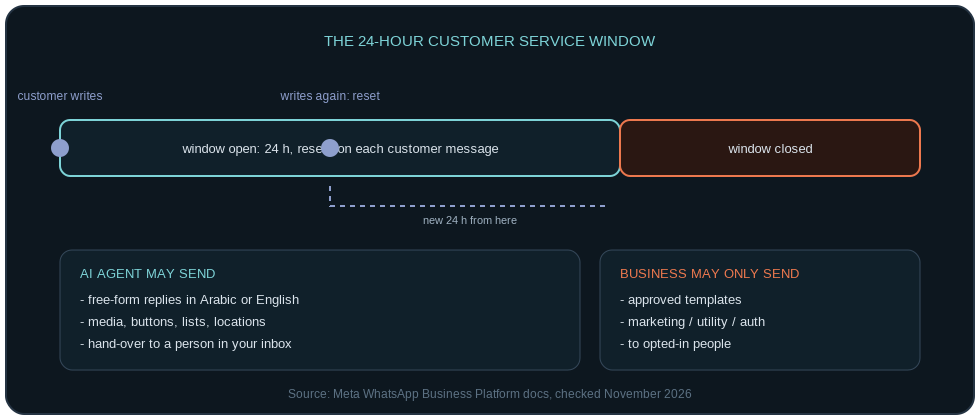
Second, the customer service window. According to Meta’s messaging docs, when a customer messages or calls you, a 24-hour timer starts, and it resets each time they message again. Inside the window your agent can send text, images, documents, buttons and lists freely.
Third, templates. Outside the window you can only send template messages, and each one must be categorized as marketing, utility or authentication and approved before use. Review can take up to 24 hours.
| Inside the 24-hour window | Outside the window | |
|---|---|---|
| Who starts it | The customer’s message or call | Your business |
| What the agent can send | Any reply: text, media, buttons, lists | Approved templates only |
| Typical use | Answering questions, bookings, support | Reminders, order updates, offers to opted-in customers |
| Design rule | Let the AI write the reply, with guardrails | Pre-write and approve Arabic and English versions |
One more rule matters for AI. Since 15 January 2026, Meta’s terms bar general-purpose AI assistants from the WhatsApp Business Platform, while businesses using AI to serve their own customers are not barred. Keep your agent focused on your business, and read Meta’s current terms before launch.

"Most of the work in a WhatsApp agent is not the AI. It is deciding what the agent must never say, and making the hand-over to a person feel natural to the customer."
How do you handle Arabic, costs and customer data?
- Arabic. Test with real messages: Gulf dialect, Modern Standard Arabic, English, mixed sentences and Arabizi (Arabic written in Latin letters). Reply in the customer’s language, and write Arabic templates natively rather than translating the English ones.
- Message costs. Meta now charges per delivered message, with the price set by the message category and the recipient’s country code, and service-message terms have changed during 2026. Rates for Saudi and UAE numbers are on Meta’s WhatsApp pricing page; budget from there, not from a blog post.
- AI costs. Each reply also costs model usage, which depends on conversation length and how much context you send. Measure it in a pilot before you roll out to all customers.
- Customer data. Saudi Arabia’s PDPL and the UAE’s data-protection law both affect what you store, where you host it and which vendors process it. Decide retention, hosting region and the AI provider’s data terms early, and check the details with your adviser.
- Quality rating. Meta rates each business number and template on quality and uses it to set sending limits. Sending templates people did not ask for lowers it.
How do you launch a WhatsApp agent safely?
- Pick one job, such as order status or bookings, and write down what the agent may and may not do, including topics it must always hand to a person.
- Collect a test set of real customer messages in Arabic and English, and agree what a good answer looks like for each before you build.
- Set up the business number, verify your business with Meta, and submit Arabic and English templates early, since approval is a separate step.
- Pilot with a small group of customers, with your team watching every conversation and correcting the agent’s instructions daily.
- Measure resolution rate, hand-over rate, complaints and cost per conversation, then widen the rollout only when those numbers hold.
The pilot is where most of the learning happens. Customers ask things nobody predicted, mix languages mid-sentence and send voice notes, and each of those needs a decision about whether the agent answers or a person does.
How Devoun builds them: we start with a fixed-price Discovery at $200 (about SAR 750 or AED 735), credited to the build, that maps the use case, the systems, the templates and the data rules. Then we build the agent in Arabic and English with a human hand-over and a test set of real messages. See our AI agent development service for Saudi Arabia; every milestone is covered by our money-back guarantee.
Frequently Asked Questions
Can an AI agent reply to customers on WhatsApp automatically?
Yes, through the WhatsApp Business Platform Cloud API. Incoming messages reach your server by webhook, your agent decides the reply, and your server sends it back. Free-form replies are allowed while the 24-hour customer service window is open; after that you need an approved template.
What is the WhatsApp 24-hour customer service window?
When a customer messages or calls your business, a 24-hour window opens, and it resets each time they message again. Inside it you can send any kind of message. Outside it you can only send pre-approved template messages, to people who have opted in.
Are AI chatbots allowed on WhatsApp Business?
AI agents that serve your own business, such as support, bookings or order updates, are allowed. Since January 2026 Meta’s terms bar providers of general-purpose AI assistants from using the Business Solution. Check Meta’s current terms before launch.
Does a WhatsApp AI agent work in Arabic?
Yes, current language models handle Modern Standard Arabic and English well, and most Gulf dialects reasonably. Test with real customer messages, including mixed Arabic and English and Arabizi, and approve Arabic versions of every template separately.
Final thoughts
A WhatsApp AI agent is worth building when it does one clear job for your customers, follows Meta’s window and template rules, and knows when to call a person. Start narrow, test in both languages with real messages, and budget from Meta’s current pricing, not from guesses.
