In this piece
Stripe Webhooks in AI-Built Apps: What Breaks and How to Fix It
If your Stripe webhook is not working in an app built with Lovable, Bolt, Replit or Cursor, the payment almost always succeeded and the problem is on your side: the handler rejects, misses or double-processes the event. The usual causes are a request body parsed as JSON before the signature check, the wrong signing secret, a route that redirects or needs a login, a handler too slow to answer, and no protection against duplicate events. Each one is a small fix once you know which it is. This guide shows how to spot each failure and fix it, with code for the current Stripe Node library. It is the same checklist we run when we take on a vibe coding rescue where customers paid and got nothing. Most teams can work through it in an afternoon; the duplicate-safe fulfillment step is the one that usually needs a proper code change.
We reviewed the external references on 19 November 2026. Stripe updates its SDKs and event formats often, so check the linked docs against the library version in your own package.json.
Customers paying and not getting access? We can find out why.
Get a payments reviewWhy is my Stripe webhook not working?
Open the Stripe Dashboard, go to the Webhooks tab in Workbench, select your endpoint and check the Event deliveries list. The status code there tells you which half of the problem you have. Stripe’s webhook documentation treats any redirect, 4xx, 5xx, TLS error or timeout as a failed delivery.
| What you see | Likely cause in an AI-built app | Fix |
|---|---|---|
| 400, “No signatures found matching the expected signature” | Body parsed as JSON, or wrong signing secret | Verify the raw body with the right endpoint’s secret |
| 401 or 403 | Webhook route sits behind auth middleware or a JWT check | Exempt the route; the signature is the authentication |
| 302 or another 3xx | Trailing slash, www or HTTP-to-HTTPS redirect | Register the final URL, exactly |
| 404 | Route path changed, or the endpoint points at a preview URL | Point the endpoint at the production domain |
| Timed out, or 500 | Handler sends emails and calls APIs before answering | Return 2xx first, do the work in a queue |
| 200, but orders are doubled or missing | No duplicate check; handler assumes event order | Record event IDs; fulfill idempotently |
How do I fix “No signatures found matching the expected signature”?
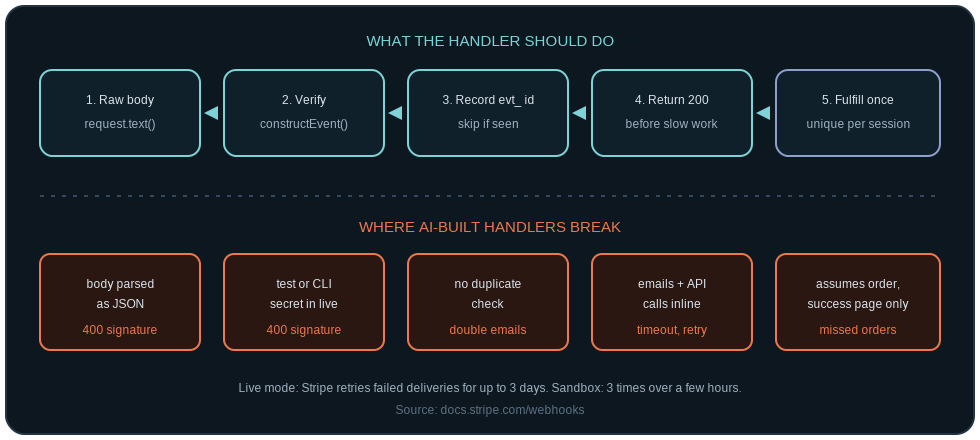
Stripe signs every delivery with an HMAC of the exact bytes it sent. Its docs are blunt: Stripe “requires the raw body of the request” and any change to it makes verification fail. AI builders tend to generate a handler that calls request.json(), or an Express app with a global express.json() middleware, and then pass JSON.stringify(body) to the check. The string looks the same but is not byte-for-byte identical, so the signature never matches.
The fix is to read the body as text and give it, unchanged, to the Stripe Node library:
// app/api/stripe/webhook/route.ts (Next.js App Router, Node.js runtime)
import Stripe from 'stripe';

const stripe = new Stripe(process.env.STRIPE_SECRET_KEY!);
const endpointSecret = process.env.STRIPE_WEBHOOK_SECRET!;

export async function POST(request: Request) {
  // The raw body, exactly as Stripe sent it. Never request.json() here.
  const payload = await request.text();
  const signature = request.headers.get('stripe-signature') ?? '';

  let event: Stripe.Event;
  try {
    event = stripe.webhooks.constructEvent(payload, signature, endpointSecret);
  } catch (err) {
    console.error('Stripe signature check failed', err);
    return new Response('Invalid signature', { status: 400 });
  }

  // Record the event once and queue the slow work; answer Stripe fast.
  await recordAndQueue(event);
  return new Response(null, { status: 200 });
}
In an Express app, the order of middleware matters:
// Express: register the raw route BEFORE app.use(express.json())
app.post('/webhook', express.raw({ type: 'application/json' }), handler);
app.use(express.json());
On Supabase Edge Functions, which Lovable and Bolt apps often use, the runtime is Deno, so Supabase’s Stripe example uses constructEventAsync with a Web Crypto provider instead. Deploy that function without JWT verification, because Stripe does not send a Supabase token; that missing step is behind many 401 errors.
If the body is raw and verification still fails, the secret is wrong. Every endpoint has its own whsec_ secret, the same URL has a different secret in test and live mode, and stripe listen prints a third one for local testing. The Stripe-Signature header can also carry a redacted secret debugging hint you can compare with the end of your own value; never use it for verification.
Why do Stripe webhooks fire twice, or arrive out of order?
Because Stripe promises neither exactly-once delivery nor order. The docs say endpoints “might occasionally receive the same event more than once”, and that Stripe “doesn’t guarantee the delivery of events in the order that they’re generated”. A new subscription can produce invoice.paid before customer.subscription.created reaches you. Retries add more repeats: in live mode Stripe retries a failed delivery for up to three days with exponential back-off.
AI-generated handlers usually assume one event, once, in order. That is how customers get two licence emails, or a subscription row that is updated before it exists. Two rules fix it. First, log each event ID and skip ones you have already seen. Second, make the business action itself unique, because Stripe notes that sometimes two separate event objects describe the same change. Its fulfillment guide says your fulfill function may be called several times, “possibly concurrently”, for the same Checkout Session.
create table if not exists stripe_events (
  id text primary key,              -- evt_...
  type text not null,
  received_at timestamptz not null default now()
);

-- Returns a row only the first time this event arrives
insert into stripe_events (id, type)
values ($1, $2)
on conflict (id) do nothing
returning id;

-- And make fulfillment itself unique per Checkout Session
alter table orders
  add constraint orders_checkout_session_unique unique (stripe_checkout_session_id);
For ordering, do not trust the event payload as the final state. When an event arrives, fetch the current subscription or Checkout Session from the API and write that. Do not use the event’s created timestamp to sort events either: it is in seconds, and several events can share it.
Two smaller habits help as well. Subscribe the endpoint only to the event types your code handles; AI builders often tick “all events”, which Stripe advises against because it puts needless load on your server. And move the real work, such as sending emails, updating the CRM or provisioning accounts, to a background queue. Stripe recommends asynchronous processing so that a spike in deliveries, for example when many subscriptions renew on the first of the month, does not overwhelm the handler and trigger a wave of retries.
Why does it work in test mode but fail in live mode?
- Different secrets. The live endpoint has its own signing secret. Production environment variables often still hold the test one, or the CLI one.
- Different endpoints. Test and live webhook endpoints are configured separately. Check that the live one exists, points at the production domain and subscribes to the events your code handles, including
checkout.session.async_payment_succeededif you accept bank debits. - HTTPS and redirects. Live endpoints must be public HTTPS URLs with TLS 1.2 or higher, and a redirect counts as a failure.
- Retries behave differently. Sandbox events are retried three times over a few hours, live events for up to three days, so a bug can look intermittent in one mode and permanent in the other.
- The success page did the work. In test, you always land on the success page, so fulfilling there seemed to work. Stripe states you cannot rely on it, because a customer can pay and lose their connection before the page loads. Fulfill from the webhook, and optionally from the page too, with the same idempotent function.

"A webhook handler is the one place where an AI builder’s optimism is expensive. It has to assume the event is fake, late, repeated and out of order, and still do the right thing exactly once."
How to test your webhook before launch
- Forward events locally with the Stripe CLI and trigger the events your app depends on.
- Send a request with a changed body and confirm your handler returns 400.
- Resend the same event twice and confirm the customer is charged and served once.
- Make your handler fail on purpose, then fix it and watch the retry succeed in Event deliveries.
- In live mode, make one real low-value purchase and refund it, and check every step in the logs.
stripe login
stripe listen --forward-to localhost:3000/api/stripe/webhook
# copy the whsec_... it prints into STRIPE_WEBHOOK_SECRET, restart the app, then:
stripe trigger checkout.session.completed
# replay a real event to a specific endpoint
stripe events resend evt_123 --webhook-endpoint=we_123
How Devoun handles this: in a vibe coding rescue we trace each payment from Checkout to your database, fix the signature check, add event logging and idempotent fulfillment, and test retries and duplicates before handing it back. The work is quoted at a fixed price and covered by our money-back guarantee.
Frequently Asked Questions
Why does Stripe say “No signatures found matching the expected signature”?
Almost always because the body was changed before verification, for example parsed into JSON and turned back into a string, or because the code uses a different endpoint’s signing secret. Pass the raw request body and the secret of the exact endpoint (or the one printed by stripe listen) to the Stripe library.
Why does my Stripe webhook work in test mode but not in live mode?
Test and live endpoints have different signing secrets, and the Stripe CLI prints a third one. Live mode also needs a public HTTPS URL that answers POST without a redirect or login. Check the live endpoint’s secret, URL and event types in the Dashboard.
Can Stripe send the same webhook event twice?
Yes. Stripe says endpoints might occasionally receive the same event more than once, and it retries failed deliveries. Store each event ID you have processed and skip repeats, and make fulfillment safe to run twice for the same Checkout Session.
How long does Stripe retry a failed webhook?
In live mode Stripe retries for up to three days with exponential back-off. Events from a sandbox are retried three times over a few hours. You can also resend an event from the Dashboard or with the Stripe CLI.
Final thoughts
Stripe webhooks fail in AI-built apps for ordinary reasons: a parsed body, the wrong secret, a redirect, a slow handler or a missing duplicate check. Verify the raw body, answer fast, record every event ID and make fulfillment safe to run twice. Then a late or repeated event becomes a non-event instead of a support ticket.
